
WordPress SEO in 2026: Rank in Google and AI Search


WordPress powers around 40% of all websites, which is exactly why ranking a WordPress site is harder than it looks: the platform gives you the foundations but leaves the SEO decisions to you. Get those decisions right and WordPress SEO becomes one of the highest-impact things a growing business can do, because the same clean structure that helps Google also helps AI assistants like ChatGPT and Perplexity cite you. Get them wrong and you can spend months publishing content that search engines quietly ignore. We build and optimise client sites on WordPress every week, so this guide is the working system we use rather than a list of generic tips. You will learn how to configure the settings once, choose the right plugin, cover on-page and technical SEO, protect your site speed and structure content that ranks in Google and earns citations across AI search.
What WordPress SEO Involves in 2026
WordPress SEO is the work of configuring, optimising and structuring a WordPress site so it ranks in Google and gets cited by AI search tools like ChatGPT, Perplexity and Google AI Overviews. It runs across four layers: one-time technical settings, a good SEO plugin, on-page and content quality, then site speed. WordPress is genuinely SEO-friendly out of the box, but the results come from the decisions you make on top of it, not from the platform alone.
Get WordPress SEO That Compounds
We configure WordPress for crawl efficiency, content structure and AI visibility, then tie the work to revenue. See how our technical SEO consulting helps WordPress sites rank and get cited.
Explore Technical SEO ConsultingWhat Is WordPress SEO, and Is WordPress Good for SEO?
Search engine optimisation is the practice of earning visibility in search results without paying for each click. WordPress SEO is that same practice applied to the specifics of the WordPress platform: its themes, plugins, settings screens and content editor. The goal has widened over the last two years. You are no longer optimising only for a blue link in Google. You are also trying to become the source that AI assistants quote when someone asks a question, which rewards clear, well-sourced, well-structured content.

WordPress is a strong SEO foundation for three reasons:
- Clean, editable HTML: Most quality themes output semantic HTML that search engines and AI crawlers can read without a struggle.
- Full control of the important settings: You can set your own URLs, titles, meta descriptions, canonical tags and indexing rules, which many hosted website builders hide.
- A deep plugin ecosystem: A single SEO plugin adds titles, sitemaps, schema and controls that would otherwise need custom code.
Two WordPress basics are worth getting straight early. The platform separates content into posts, which are dated and usually form your blog, and pages, which are static like a services or about page. Both can rank, so match the type to the intent: evergreen guides work well as posts inside a category, while core commercial content sits better on pages. Your theme matters too. A bloated theme stuffed with features you will never use drags down speed and buries your content in extra code, so a lightweight, well-coded theme is a quiet SEO advantage before you write a single post.
The catch is that WordPress does almost none of this for you automatically. It ships with defaults that are fine for launching a site and wrong for ranking one. That gap is where most of the wins live. When the work is done properly the results are real. On a B2B professional-services WordPress site, structured technical and content work helped compound organic demand over a long window (about $8.7M attributed revenue over 27 months, ongoing). We also ran the same foundations-first system on a B2B fintech WordPress site through mid-2026, before that property moved off WordPress. WordPress did not do that alone. The decisions layered on top of WordPress did.
WordPress SEO Foundations: The Settings You Configure Once
Before you write a word of content, five settings decide whether Google and AI crawlers can even use your site. These take about fifteen minutes to fix and they pay back for the life of the site. Work through them in order on any new WordPress build.
Tell WordPress to Allow Indexing
WordPress has a single checkbox under Settings then Reading called "Discourage search engines from indexing this site". When it is ticked, WordPress adds a site-wide instruction that asks search engines to stay away, and a page carrying that noindex signal will not rank at all. Developers often tick it during a build and forget to untick it at launch. Confirm this box is unchecked on every live site. It is the single most damaging setting on the platform.
Set SEO-Friendly Permalinks
By default some WordPress installs still use URLs like ?p=123, which tell a reader and a search engine nothing. Go to Settings then Permalinks and choose the "Post name" option so your addresses read like yoursite.com/wordpress-seo. Follow the WordPress permalink guidance and treat a live URL as permanent. If you must change one later, set up a 301 redirect from the old address so you keep the ranking value.
Confirm HTTPS Indexation (Not a Fresh Install Checklist)
HTTPS has been the default on serious WordPress hosts for years, so "install SSL" is rarely the job anymore. What still breaks sites is split indexation: the same content on http:// and https://, or on both www and non-www, without one canonical host. In Google Search Console, confirm you are monitoring the HTTPS host you want, that HTTP URLs 301 to HTTPS, and that the index is not split across protocols. Use URL Inspection on key templates if traffic looks half-sized after a host or CDN change. Google's HTTPS ranking-signal note still explains why the secure host must own the index.
Pick a Single Domain (www or Non-www)
Google can treat www.yoursite.com and yoursite.com as two separate sites, which splits your authority and can create duplicate content. Choose one version, set it under Settings then General, and redirect the other to it. It does not matter which you pick. It matters that you pick one and stay consistent.
Submit Your XML Sitemap to Search Console
Since WordPress 5.5 in August 2020, the core software builds a basic XML sitemap automatically at /wp-sitemap.xml. An SEO plugin usually replaces this with a richer version at an address such as /sitemap_index.xml. Either way, verify your site in Google Search Console and submit the sitemap there so Google has a clean map of every page you want found. This is also where you will watch indexing and performance over time.
Choosing a WordPress SEO Plugin: Yoast, Rank Math, AIOSEO or SEOPress
An SEO plugin is the control panel for everything you cannot reach in the default settings:
- Per-page titles and meta descriptions
- Schema markup
- Sitemaps
- Breadcrumbs
- Redirects
- Indexing rules
You need exactly one. Running two at once creates conflicting tags and duplicate output. The four plugins below are the ones we see most on client sites, and the honest answer is that any of them will do the core job well. The right pick depends on your budget, your skill level and whether you run a store or many sites.
- Yoast SEO: The most-installed option, with more than 10 million active installations and a 4.8-star rating. Its content and readability analysis makes it the friendliest starting point for beginners. There is a full free plugin plus a paid Premium tier for extras like redirect management and internal linking suggestions.
- Rank Math: A feature-rich challenger with over 4 million installations. Its free tier is generous, with strong schema controls and built-in analytics, which appeals to users who want more levers without paying early.
- All in One SEO (AIOSEO): A business-oriented option with a free AIOSEO Lite plugin and paid plans above it. Its local SEO and schema tools and its WooCommerce features make it a common choice for online stores.
- SEOPress: A lightweight, privacy-minded plugin that ships with no ads or tracking. Its paid PRO tier covers unlimited sites on one licence at a low yearly cost, which suits people running several sites.
Here is how the four compare at a glance. Pricing is promotional and currency-sensitive, so treat the figures as a guide and check each vendor's page for the current number.
| Plugin | Free version | Paid entry (at the time of writing) | Best suited to |
|---|---|---|---|
| Yoast SEO | Yes, full-featured | Premium from about US$120 per year, per site | Beginners who want guided content and readability help |
| Rank Math | Yes, generous | PRO from about EUR 8 per month, billed yearly | Users who want more built-in features on a lower budget |
| AIOSEO | Yes, Lite version | Paid plans from about US$50 first year | WooCommerce stores and sites needing strong local and schema tools |
| SEOPress | Yes, no ads or tracking | PRO from about US$49 per year, unlimited from about US$149 | Privacy-minded users and anyone running many sites |
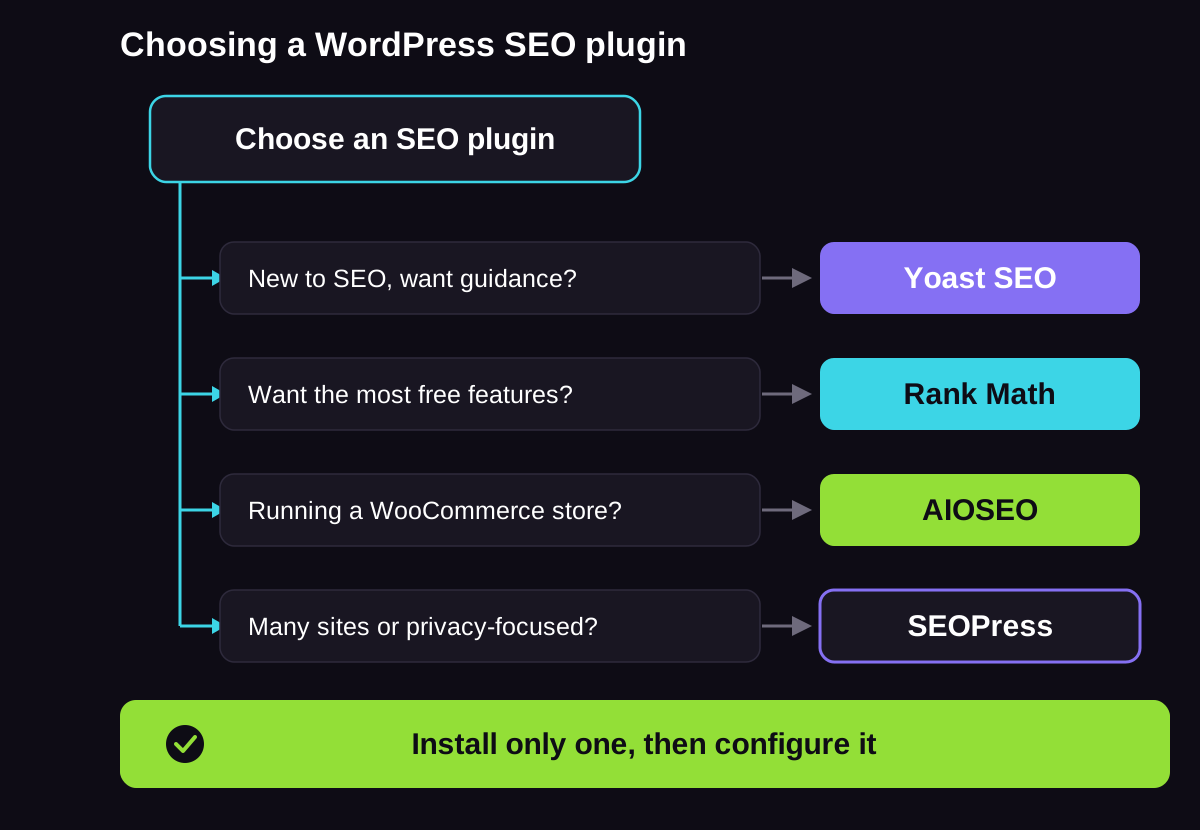
Do not agonise over this choice. Installing any of the four and configuring it properly beats leaving your titles, sitemaps and schema to chance. If you are unsure, start with Yoast for its guidance or Rank Math for its free features, and move later if you outgrow it.
Whichever you pick, spend ten minutes on the setup wizard rather than accepting the defaults. Cover the basics:
- Connect Search Console: So the plugin can surface indexing and performance data next to your content.
- Set your default title format and separator: So every page ships with a sensible title from day one.
- Turn on the XML sitemap: Confirm it loads, then submit it to Search Console.
- Set your indexing defaults: Noindex the thin archive pages you do not want competing with real content.
A plugin left on its defaults does a fraction of the job it could.
On-Page SEO in WordPress
On-page SEO is everything you control inside a single post or page to help it rank for the terms that matter. WordPress and your SEO plugin give you every field you need. The skill is knowing what to put in them.
Start With Keyword Research
Every page should target one primary topic that real people search for, not a phrase you assume they use. Solid keyword research tells you the words your audience actually types and asks, and how much competition each term carries. Group related terms so one thorough page can answer a whole cluster of questions rather than spreading thin across many weak pages. For grouping at scale we use Keyword Insights, which has been our clustering tool for more than five years because it sorts hundreds of terms into logical page topics far better than the clustering built into the big all-in-one platforms. Match each page to the intent behind its keyword as well. A term like "best wordpress seo plugin" wants a comparison, while "how to do wordpress seo" wants a guide, and serving the wrong format is why plenty of well-written pages never rank.
Write Titles and Meta Descriptions That Earn Clicks
Your SEO plugin adds a dedicated field for the SEO title and meta description on every post, separate from the on-page headline. Lead the title with the primary term and keep it close to sixty characters so it does not truncate. Write the meta description for a human deciding whether to click, using the search term naturally. This is also where semantic SEO matters: cover the related concepts and questions around your topic so Google and AI systems understand the full meaning of the page, not just the exact keyword. Google sometimes rewrites the title it shows when it thinks it can do better, so write a clear, accurate title rather than a keyword-stuffed one, and write a clear, accurate title that matches the page content.
Use One H1 and a Clear Heading Structure
Each page needs a single H1, which in WordPress is usually the post title, followed by H2 and H3 subheadings in a logical order. Clear headings help readers scan, and they help AI systems that pull answers at the passage level find the exact section that answers a query. Write each heading so it describes the content underneath it plainly.
Optimise Images and Alt Text
Every image should have descriptive alt text that explains what the image shows. Alt text supports accessibility, feeds Google Images and gives AI crawlers extra context. Name your files sensibly before uploading, and compress them so they do not slow the page, which leads straight into the speed section below. Serve images in a modern, lighter format where you can, and let WordPress lazy-load images below the fold so they do not block the first view.
Link Between Your Posts
Internal links pass authority around your site and show search engines how your pages relate. When you publish a new post, link to it from older relevant posts using descriptive anchor text, and link out from the new post to your most important pages. This simple habit, done every time, is one of the most underused levers in WordPress SEO. Vary your anchor text so it reads naturally instead of repeating the exact keyword every time, which looks manufactured to search engines.
Technical SEO for WordPress
Technical SEO makes sure search engines and AI crawlers can reach, read and trust your pages. WordPress handles some of this well and creates a few problems of its own that you need to manage. Our full technical SEO approach goes deeper, but these are the WordPress-specific priorities.
Control What Google Crawls and Indexes
Not every URL WordPress generates deserves to be in the index. Author archives, date archives, internal search results and attachment pages often add thin, near-duplicate content that dilutes your site. Use your SEO plugin to set these to noindex, so search engines spend their crawl budget on the pages you actually want ranked. Check Search Console's index coverage report every so often to catch anything unexpected slipping in.
Tame Category and Tag Archives
WordPress categories and tags are helpful for readers, and a common source of duplicate content when left unmanaged. Assign each post one primary category, resist the urge to attach a dozen tags, and decide deliberately whether those archive pages should be indexed. Many sites are better off keeping tag archives out of the index entirely. The goal is one clear home for each topic, not five thin pages competing for the same term.
Check Your Robots File and Crawl Health
WordPress serves a virtual robots.txt file that tells crawlers where they may and may not go. Most sites need very little here, so resist blocking folders you do not understand, since an over-eager rule can hide pages you want ranked. What does pay off is fixing broken links: when a URL returns a 404, either restore the content or 301-redirect it to the closest live page, so you stop wasting crawl budget and losing the authority those links carried. Search Console's pages report is the fastest way to spot both problems.
Add Schema With Your SEO Plugin
Schema markup is structured data that labels what your content is, such as an article, a product, a review or an FAQ. Every SEO plugin listed above can add it without code. It earns eligibility for rich results in Google, and it matters even more for non-Google AI platforms like Perplexity and ChatGPT, which lean on schema more heavily when they parse a page to decide what to cite. Our guide to schema for SEO covers which types to prioritise. The one rule that never bends: schema must describe content that is genuinely on the page. Never mark up an FAQ the reader cannot see.
Do Not Forget Mobile
Google indexes the mobile version of your site first, so a theme that only looks right on desktop is a ranking problem. Choose a responsive theme, then check real pages on a phone rather than trusting the desktop preview. Tap targets, font sizes and layout shifts all affect the experience and the ranking. Our mobile SEO notes go further, but a responsive theme and a real-device check cover most of it.
WordPress Site Speed and Core Web Vitals
Page speed is part of Google's page experience signals, and a slow site frustrates the visitors you worked hard to earn. Google measures the experience through Core Web Vitals, three metrics with clear targets:
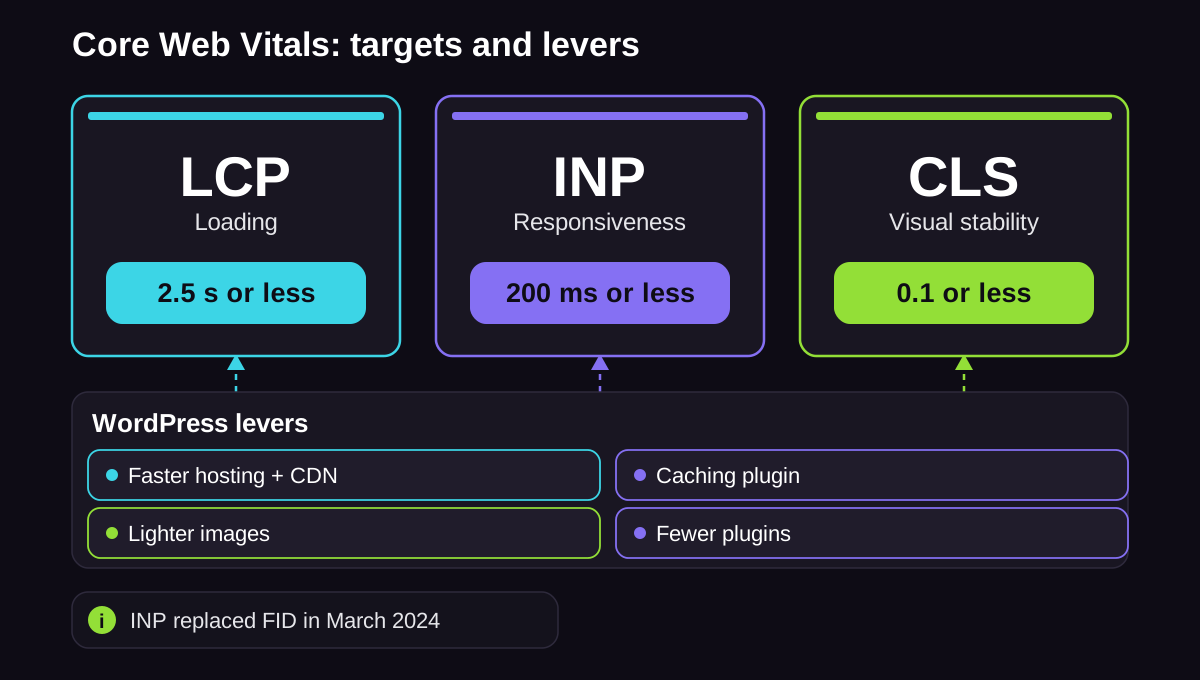
- Largest Contentful Paint (LCP): How long the main content takes to appear. Aim for 2.5 seconds or less.
- Interaction to Next Paint (INP): How quickly the page responds when someone taps or clicks. Aim for 200 milliseconds or less. INP replaced First Input Delay in March 2024 as the responsiveness metric, so older guides that mention FID are out of date.
- Cumulative Layout Shift (CLS): How much the layout jumps around while loading. Aim for 0.1 or less.
WordPress sites usually fail these for predictable reasons, and the levers to fix them are just as predictable:
- Hosting is the biggest lever: Budget shared hosting produces slow server responses that no plugin can fully rescue. Managed WordPress hosting with a content delivery network is the highest-impact upgrade for most sites.
- Caching does the heavy lifting: A caching plugin such as WP Rocket or the free W3 Total Cache serves stored copies of pages instead of rebuilding them on every visit, which cuts load times sharply.
- Images are the usual weight problem: Compress images with a tool like Imagify, serve them in modern formats and size them correctly. Oversized images are the most common cause of a poor LCP score.
- Plugin bloat slows everything: Every active plugin adds code that loads on your pages. Audit them now and then, deactivate what you do not use and prefer one well-built plugin over three that overlap.
Hosting is usually the highest-leverage speed decision on WordPress. Use this shortlist when you outgrow budget shared hosting.
| Host | Type | SEO / performance notes | Best for |
|---|---|---|---|
| Cloudways | Managed cloud | Fast stack, staging, CDN add-ons, server control without full sysadmin work. Strong when Core Web Vitals stall on shared hosting. | Growing WordPress and WooCommerce sites |
| WP Engine | Managed WordPress | Solid caching and support; watch visit and site limits on plan tiers. | Agencies and multi-site WP |
| SiteGround | Managed shared / cloud | Mid-market host with free CDN and caching. Fine for smaller sites; load-test before peaks. | Smaller business WP sites |
| Hostinger | Shared / cloud | Low entry price. Upgrade when TTFB and uptime matter more than cost. | Early-stage launches |
Whatever you pick, measure TTFB and Core Web Vitals on real templates after migrate. The brand on the invoice matters less than whether LCP, INP and CLS clear Google's mobile thresholds.
Measure before and after with Google's free PageSpeed Insights, which reports your Core Web Vitals against those thresholds. For a repeatable process, our method to audit Core Web Vitals walks through diagnosing each metric in turn rather than guessing. Speed is not only a Google signal either. A fast, stable page is easier for AI crawlers to fetch and render, so the same fixes support your AI search visibility.
Content Architecture: Topic Clusters and Pillars on WordPress
Individual optimised pages rank. Interconnected groups of pages dominate. The pattern that builds lasting authority is the topic cluster: one broad pillar page on a core subject, supported by focused posts that each answer a specific question and link back to the pillar. WordPress makes this easy to build with categories and internal links, and it is the difference between a blog and a body of work.
- The pillar page: A thorough page targeting your main topic, giving the overview and linking to every supporting post. Our take on pillar content explains how to scope one.
- The cluster posts: Detailed posts that each target a narrower question and link up to the pillar, signalling depth on the subject.
- The internal links: The connective tissue that tells Google and AI systems these pages belong together and that you cover the topic completely.
On WordPress, categories are the natural home for clusters. Plan a category around each pillar, publish the supporting posts into it, then link every post back to the pillar and out to a couple of siblings. That way your site structure mirrors your topic structure, which is exactly the signal Google and AI systems use to judge whether you genuinely cover a subject or only touch it.
We have watched this compound on real client work. For one B2B SaaS client we clustered more than 2,300 keywords into a deliberate content architecture and helped them reach 4,118 page-one rankings and $1.31M in attributed revenue at a 1,909% return in twelve months. The structure did the compounding. Our topic cluster framework is the step-by-step version of what got them there.
Optimising WordPress for AI Search (GEO)
More people now start their research inside an AI assistant. ChatGPT alone reached around 900 million weekly users in early 2026, and Google shows AI Overviews above the traditional results for a large share of queries. Generative engine optimisation, or GEO, is the work of getting your content quoted in those answers. The good news for WordPress owners is that it is not a separate discipline you bolt on. It is what you get when you do the work above well.

Start with the reader. The content that AI systems cite is content that genuinely answers the question, written clearly by someone who knows the subject. Google is explicit about this in its own AI optimisation guidance: there are no special files or markup that make you appear, and the same helpful, people-first content and technical fundamentals that drive Search also drive its AI features. Anyone selling a trick to game the model is selling the wrong thing.
Once the content is genuinely useful, structure helps it get extracted. Independent research into generative engine optimisation tested what actually lifts a page's presence in AI answers and found gains of up to 40% from a short list of reader-first moves:
- Cite credible sources: Back your claims with links to authoritative references, exactly as this guide does.
- Include relevant statistics: Specific numbers give an AI system something concrete to quote.
- Add quotations: Named quotes and clear attributions read as trustworthy to people and machines alike.
- Write with clarity and authority: Plain, confident, well-organised passages are easier to lift into an answer.
On the WordPress side, three things make your genuinely useful content easier for AI systems to use: clean crawlable structure so AI crawlers such as OpenAI's GPTBot and Google-Extended can read it, detailed schema through your SEO plugin so non-Google platforms can parse it, and the topic-cluster depth that signals you cover a subject fully. Our full guides to AI SEO and generative engine optimisation go deeper on each.
One framing point we hold firmly, because it keeps expectations honest: AI citations are a visibility signal, a KPI in their own right that we track alongside rankings and revenue, never a replacement for them. For one B2B property-management client, the same structured, well-sourced content that ranked in Google also earned 598 AI cited pages on the way to about $8.7M in revenue. The citations were the leading indicator. The rankings and the revenue followed. We see this pattern across WordPress builds, which is why we build for both surfaces from the start rather than choosing between them.
Two habits keep this working over time. Track where you are being cited, since Search Console's performance reporting now includes how your pages show up in Google's AI features, and citation checks across ChatGPT, Perplexity and the rest show which content is getting picked up. Then keep your best pages fresh, because AI systems and Google both favour content that stays current, and a dated update is one of the lowest-effort wins in WordPress SEO.
The WordPress SEO Mistakes We See Most
When we take over a WordPress site, the early wins usually come from fixing self-inflicted problems rather than chasing new tactics. The same handful of mistakes turns up again and again, and every one of them is preventable.
- Leaving indexing switched off: The "Discourage search engines" box left ticked after launch, quietly blocking the entire site from ranking.
- Running default permalinks: URLs like
?p=123that waste an easy relevance and readability signal. - Skipping plugin configuration: Installing an SEO plugin and never setting the titles, sitemaps or indexing rules it exists to manage.
- Letting archives bloat the index: Dozens of thin tag and date archive pages competing with the real content and diluting the site.
- Ignoring image alt text and weight: Missing alt attributes and oversized files that hurt accessibility, image search and speed at once.
- Tolerating slow hosting: Accepting a poor Core Web Vitals score as normal instead of treating hosting as a ranking lever.
- Changing URLs without redirects: Editing a permalink and losing every ranking the old address had earned, with no 301 in place.
None of these need a specialist to fix. They need someone to work through the list deliberately, which is exactly what the sections above give you.
Keeping WordPress SEO Healthy Over Time
WordPress SEO is not a project you finish. Search engines change, plugins update, links break and content ages, so the sites that hold their rankings are the ones that get regular attention. Build a light routine and most problems never reach the point where they cost you traffic.
- Keep WordPress, your theme and plugins updated: Outdated software is the main cause of security holes and broken features, and a hacked site can be deindexed fast. Update on a schedule and check the site still works afterwards.
- Watch Search Console every month: It flags indexing problems, manual actions, broken pages and which queries you are winning or losing. It is the closest thing to a health dashboard for your SEO.
- Fix broken links and redirects: As you edit and delete content, internal and external links break. Repair or redirect them so readers and crawlers never hit a dead end.
- Refresh your best content: Pages lose ground as competitors publish and facts date. Updating a strong page with new information and a current date is one of the highest-return tasks in SEO, and our guide to content refresh covers how to prioritise which pages to revisit.
- Re-check Core Web Vitals after big changes: A new theme, a heavy plugin or a batch of large images can quietly undo your speed work, so re-test after any major change.
Thirty minutes a month on this routine protects the ranking and revenue you worked to build.
Frequently Asked Questions
What Is WordPress SEO?
WordPress SEO is the practice of optimising a WordPress website so it ranks well in search engines and gets cited by AI search tools. It covers the platform's settings, an SEO plugin, on-page and content quality, technical health and site speed. The aim is steady, non-paid visibility in both Google and AI assistants like ChatGPT and Perplexity.
Is WordPress Good for SEO?
Yes. WordPress gives you clean HTML, full control of titles, URLs and indexing, and a deep plugin ecosystem, which makes it one of the more SEO-friendly platforms available. The important point is that it does not optimise itself. The default settings are built for launching a site, so the ranking comes from the configuration and content decisions you add on top.
Do I Need an SEO Plugin for WordPress?
For practical purposes, yes. An SEO plugin gives you control over titles, meta descriptions, sitemaps, schema and indexing rules that WordPress does not expose by default. Install one, and only one, since running two at the same time creates conflicting tags. Any of the major plugins covers the core job well.
Which SEO Plugin Is Best for WordPress?
There is no single best plugin, only the best fit for your situation. Yoast SEO suits beginners with its content guidance, Rank Math offers more features on a lower budget, AIOSEO works well for WooCommerce stores, and SEOPress is a strong lightweight choice for many sites. Judge them on your budget, skill level and whether you run a store or a network of sites, not on a ranked list.
Where Is the SEO Title in WordPress, and How Do I Change It?
The SEO title is separate from the visible post headline and is controlled by your SEO plugin, not by WordPress core. Scroll below the content editor to the plugin's meta box, or open its sidebar panel, and you will find a dedicated SEO title field. Edit it there, lead with your primary term and keep it close to sixty characters so it does not get cut off in results.
How Do I Add SEO Keywords in WordPress?
You add keywords by choosing one primary topic per page, then writing naturally about it and the questions around it, rather than stuffing a list of terms anywhere. Google stopped using the old meta keywords tag many years ago, so there is no hidden box that changes rankings. Place your target term in the SEO title, the URL, the first paragraph and a heading, and let genuine coverage of the topic do the rest.
How Long Does WordPress SEO Take to Work?
Most sites see meaningful movement within three to six months, with authority and revenue compounding well beyond that. Timelines depend on competition, your starting authority and how consistently you publish. As a real example, one B2C client went from a single-page site to a category leader and about $14.6M in organic revenue over 21 months (ongoing) across eleven months, which shows how quickly disciplined WordPress SEO can compound.
How Do I Optimise a WordPress Site for AI Search Like ChatGPT?
Start by writing genuinely useful content for people, since AI systems cite pages that answer the question clearly and back it with sources. Then help them extract it: keep your structure clean and crawlable, add schema through your SEO plugin, cite credible references, include specific statistics and organise content into topic clusters. There are no special AI files or tricks; the same quality and technical fundamentals that rank you in Google also get you cited in AI search.
WordPress Gives You the Keys, Not the Directions
WordPress hands you a fast, flexible platform, and the rankings come from the decisions you layer on top: the settings you fix once, the plugin you configure, the content you structure and the speed you protect. Work through this guide in order and you will clear the quiet blockers that stop good content from ranking, then build the topical depth that earns positions in Google and citations in AI search. None of it is one-and-done, so treat WordPress SEO as a system you maintain rather than a box you tick. Do that consistently and your site compounds, becoming the source that both search engines and AI assistants reach for.
About the Author
Want Insights Like This Fortnightly?

Our AI SEO strategies and tactics delivered fortnightly, including bonus trade secrets not shared anywhere else. No fluff. Just what's working right now. 5-minute read.


