
Mobile SEO: How Core Web Vitals Fixes Helped Earn 866 AI Citations

Over 52% of all global web traffic comes from mobile devices, and Google has ranked sites on their mobile version since mobile-first indexing became the default. If your site performs poorly on a smartphone, it performs poorly in search results, regardless of how strong your content or backlink profile might be. Mobile SEO covers every technical, content and user experience decision that determines whether your site ranks, loads fast and gets cited by AI platforms like ChatGPT, Perplexity and Google AI Overviews. I treat it as the technical foundation under everything else I do, because in one eCommerce engagement, fixing mobile Core Web Vitals was a prerequisite for the site earning 866 AI citations across ChatGPT, AI Overviews, AI Mode and Gemini. Getting it right is not about ticking a mobile-friendly box. It is about building the foundation that drives real search visibility and measurable revenue.
Quick Guide: What Is Mobile SEO?
Mobile SEO is the process of optimising your website so it ranks, loads and functions properly on mobile devices. With mobile accounting for more than half of global web traffic, and Google's mobile-first indexing means your mobile site is the primary version Google uses for ranking and indexing. A well-optimised mobile site directly improves your visibility in traditional search results and, as I have seen in my own client work, can be a prerequisite for being cited by AI search platforms, including ChatGPT, Perplexity and Google AI Overviews.
Find the Mobile Technical Issues Costing You Rankings and Citations
Only 11% of pages rank the same on mobile and desktop, and the gap is almost always technical. Our technical SEO consulting diagnoses mobile performance, content parity and Core Web Vitals issues, then prioritises the fixes that unlock rankings and citations.
Explore Technical SEO ConsultingWhy Mobile SEO Matters More Than Ever
Mobile SEO has moved from a nice-to-have to the technical standard for every site that wants search visibility. The data behind this shift is stark, and the consequences of ignoring it are significant.
The Scale of Mobile Search
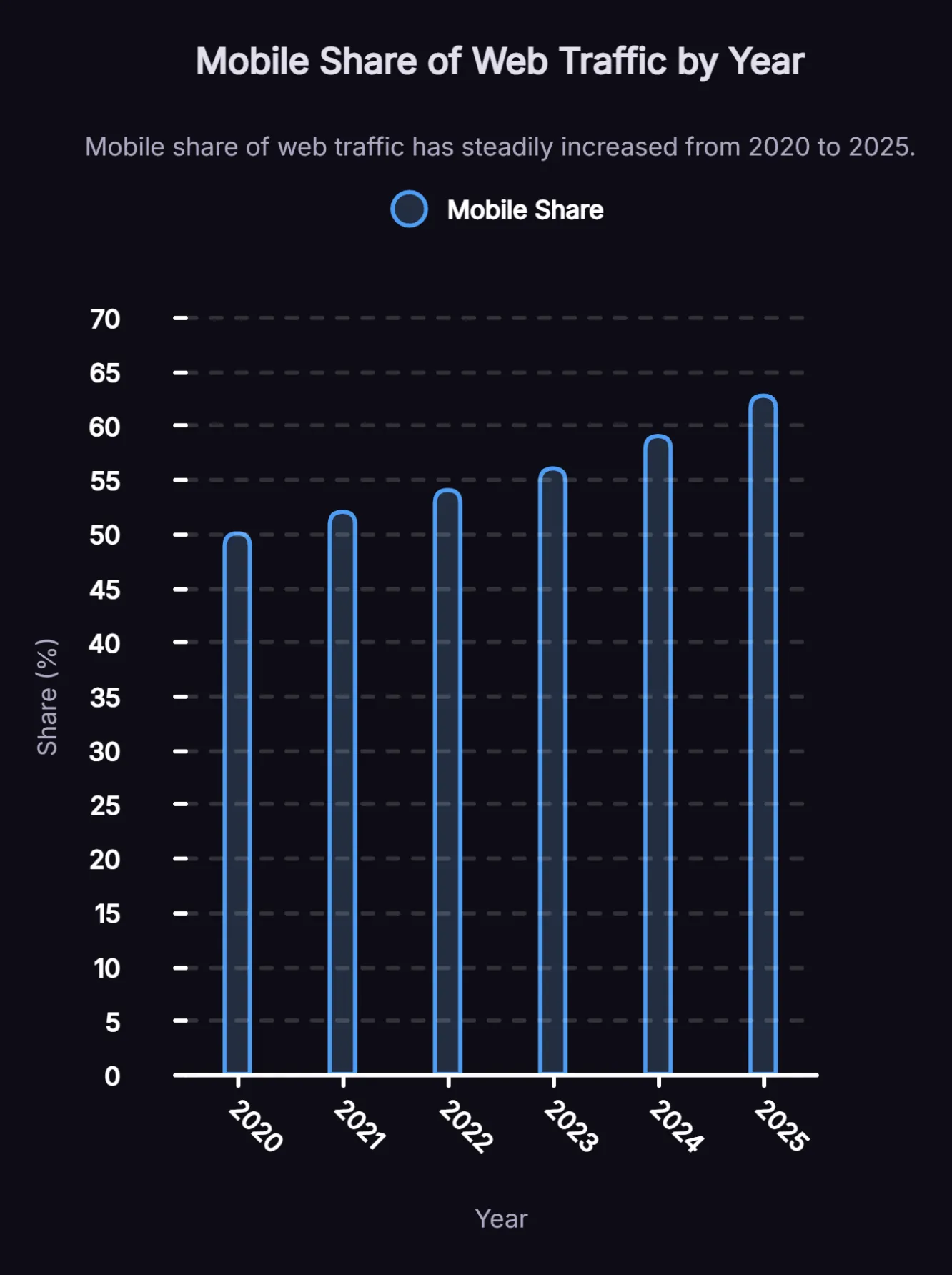
Mobile devices have consistently accounted for more than half of global web traffic since 2020, reaching a reported 62.73% peak in 2025. Google holds around 96% of the global mobile search market, meaning almost every mobile search query goes through Google's ranking systems, which prioritise mobile performance over desktop. For businesses targeting organic search, there is no longer a meaningful separation between mobile strategy and SEO strategy. They are the same thing.
Only 11% of Pages Rank the Same on Desktop and Mobile
A Semrush 2021 study found that only 11% of pages rank in the same position on both desktop and mobile. That gap exists because mobile performance signals vary significantly from desktop, including:
- Page speed
- Core Web Vitals scores
- Content parity
- Usability
Many businesses have invested in strong desktop experiences while leaving their mobile performance largely unaddressed, and their rankings reflect that gap. Closing it is where the biggest ranking opportunities often sit, and it is the first place we look when a site is underperforming on mobile.
What Mobile-First Indexing Actually Means for Your Site
Google announced in October 2023 that the move to mobile-first indexing was complete, so Google now primarily uses the mobile version of content for indexing and ranking. Understanding what it actually requires is the starting point for any serious mobile SEO effort.
Mobile-first indexing means Google uses the mobile version of your website as the primary basis for indexing and ranking, rather than the desktop version. Your desktop content, metadata, structured data and internal links all become secondary. The consequence is direct. If your mobile site is missing content that exists on desktop, Google will not rank you for it. If your mobile site loads slowly, your overall rankings suffer, including for desktop users.
Content Parity - The Most Common Mobile SEO Mistake
Differences between mobile and desktop content can create indexing problems, because Google primarily uses the mobile version of a page for crawling and evaluation. If important content is missing on mobile, it may not be fully understood or indexed. Common content parity issues include:
- Body copy or product descriptions that are shortened or hidden on mobile
- Navigation items that disappear on smaller screens
- Internal links present on desktop but absent from mobile layouts
- H1-H6 heading structures that change between devices
The fix is to audit your site with a mobile crawler and compare key pages side-by-side between devices. Content parity gaps are one of the most common reasons a site ranks below its potential on mobile, and they rarely show up when you only review the desktop version. Every piece of content that contributes to your rankings needs to be present and accessible on mobile, and closing the gap often unlocks immediate ranking improvements.
Structured Data Consistency Across Devices
Structured data markup needs to match between your mobile and desktop versions. Mobile pages often lack the schema markup present on desktop versions, which reduces your eligibility for rich snippets in mobile search results. Since rich results are especially effective on mobile devices where screen space is limited, having schema present and consistent on mobile directly supports click-through rates.
Core Web Vitals: Performance Benchmarks That Support Page Experience and Search Visibility
Core Web Vitals are Google's key performance metrics for measuring page experience. They are used by Google's ranking systems, which means poor mobile performance can weaken search visibility, especially when it creates a worse experience for users. Strong Core Web Vitals scores alone do not guarantee higher rankings, as content quality and relevance still play a larger role. There are three metrics to focus on.
1. Largest Contentful Paint (LCP)
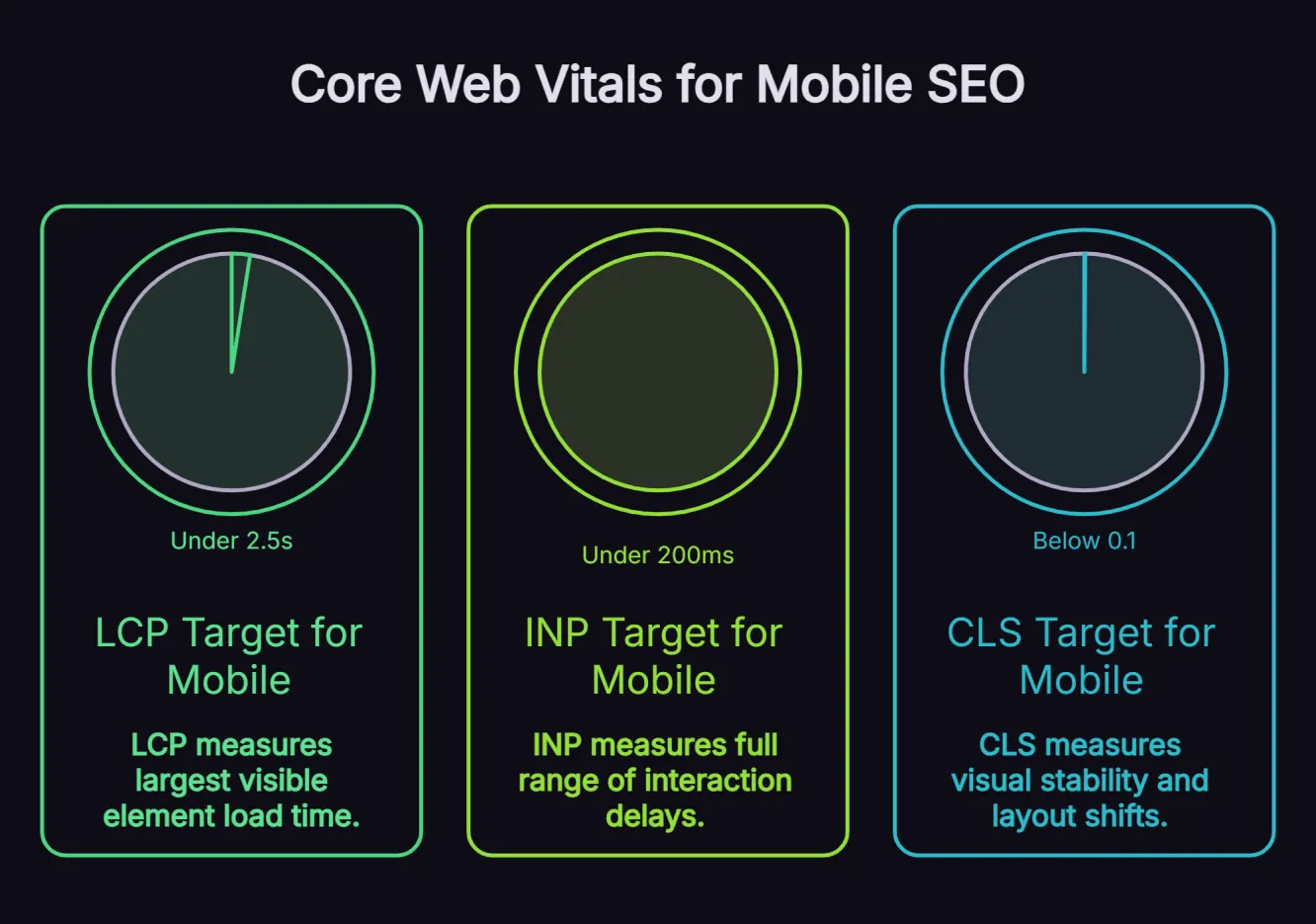
LCP measures how long it takes for the largest visible element on a page, typically a hero image or headline, to load. For good mobile SEO performance, your LCP should be under 2.5 seconds. Pages that exceed this threshold tend to have higher bounce rates and lower rankings.
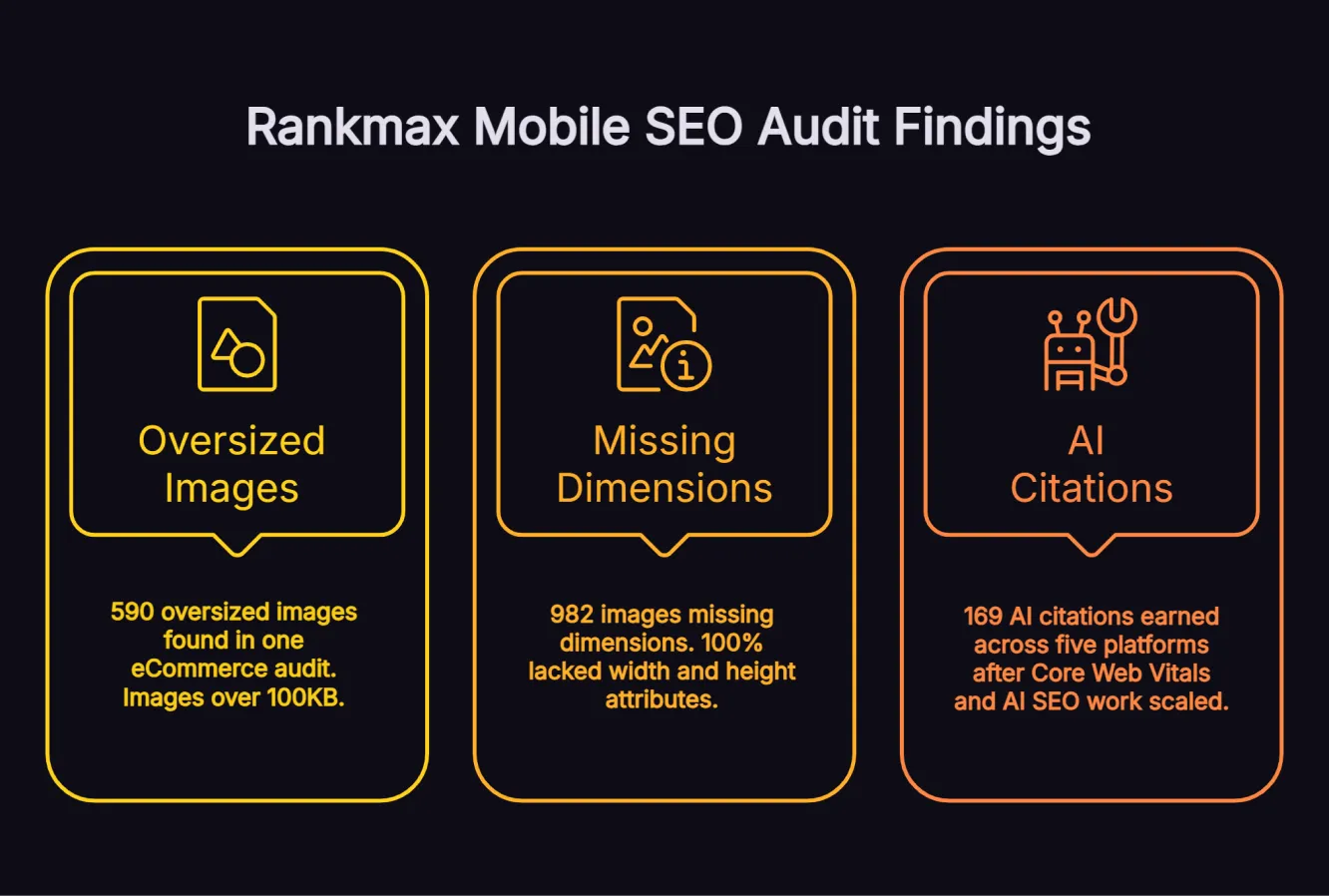
From the mobile audits we run, missing image dimensions and unoptimised images are by far the most frequent cause of slow LCP. In one eCommerce client audit, we found 590 images over 100KB that were directly responsible for poor LCP scores. Compressing those to WebP and adding proper dimensions was the single biggest LCP improvement on the engagement, ahead of any server or code change. The standard fixes still apply once images are handled:
- Convert images to WebP format
- Implement lazy loading for off-screen content
- Enable browser caching
- Use a Content Delivery Network (CDN) to reduce latency
Image optimisation is almost always the first lever we pull on mobile page speed, because it tends to deliver the largest improvement for the least effort.
2. Interaction to Next Paint (INP)
INP replaced First Input Delay (FID) in 2024 and measures the full range of interaction delays throughout a user's session, not just the first tap. INP should be under 200 milliseconds for a good mobile experience. High INP scores are typically caused by:
- Excessive JavaScript execution
- Large DOM trees
- Third-party scripts that compete for processing power on mobile hardware
Auditing and trimming third-party scripts is usually the fastest way to bring INP under control.
3. Cumulative Layout Shift (CLS)
CLS measures visual stability, or how much page content unexpectedly shifts as it loads. A CLS score below 0.1 is the target for a good user experience. On mobile, layout shifts are especially disruptive because they cause users to tap the wrong element.
When we audited one eCommerce client, 100% of their images lacked size attributes, and that single issue was responsible for most of their CLS problems. Adding width and height attributes to all 982 images resolved the majority of CLS issues immediately and gave the team a cleaner baseline for the remaining layout shifts. Dynamically injected content and font swaps were still worth checking, but in that audit, missing image dimensions were the issue that mattered most.
What We Usually Find in Mobile SEO Audits
Across recent Rankmax mobile SEO audits, the most common issues are rarely exotic technical problems. They are usually basic mobile performance and parity issues repeated across templates, product pages and media libraries.
| Mobile audit finding | What we found |
|---|---|
| Missing image dimensions | In one eCommerce audit, 100% of client images lacked size attributes, with 982 images updated. |
| Unoptimised or oversized images | In one eCommerce audit, we found 590 images over 100KB. |
| Mobile-desktop content parity gaps | Content, internal links or structured data present on desktop but missing, shortened or hidden on mobile. |
This is why we usually start mobile SEO audits with images and parity checks before moving into heavier code or server-side fixes. The fastest gains often come from fixing the repeated issues that affect hundreds of pages at once.
Responsive Design: The Right Way to Build for Mobile
Responsive design is Google's recommended approach to mobile SEO because it uses a single URL and codebase that adapts to different screen sizes. This approach is simpler to manage and avoids the content duplication and crawl budget issues associated with maintaining separate mobile and desktop sites.
What Responsive Design Actually Requires
A responsive site is not one that simply scales down to fit a smaller screen. It needs to deliver a genuinely usable experience on a phone, with fluid layouts that adjust at sensible breakpoints, readable typography and no horizontal scrolling. Every important element should also be accessible on mobile, including:
- Navigation
- Product details
- Contact information
- Internal links
- Structured data
The mistake we see most often is content that is technically present but functionally hidden. Removing primary content from the mobile HTML, or loading it only after a user interaction, is a version of the content parity gap that costs rankings. Accordions or tabs are fine as long as the content stays in the HTML and is equivalent on mobile. Google also penalises intrusive interstitials and pop-ups that block content on mobile, so review your overlay strategy as part of your audit.
In the eCommerce engagement that later earned 866 AI citations, the responsive-design issue was not just whether the layout resized on mobile. The audit showed that mobile templates needed the same commercially important content, internal links and structured data as desktop, while image handling was creating performance and layout problems at scale.
We prioritised the repeated template issues first by compressing oversized images, adding explicit dimensions and checking that important mobile content stayed present and accessible. That gave the site a cleaner mobile baseline before the AI SEO work scaled, instead of trying to earn citations from pages that were slow, unstable or incomplete on mobile.
Touch-Friendly Navigation and Button Sizing
Mobile users interact through touchscreens, and poorly sized tap targets carry real usability and conversion costs. Enlarging clickable elements, menus, CTAs and navigation links helps prevent accidental taps, especially on pages with dense navigation or conversion elements. Buttons should have a minimum tap target size of 48x48 pixels with sufficient spacing between adjacent links. Google Search Console will alert you when clickable elements are too close together. Resolve these as a priority.
Mobile Page Speed: How to Hit Google's Benchmarks
Page speed and Core Web Vitals overlap significantly, but there are specific steps beyond image optimisation that make a material difference to mobile load times.
Image Optimisation for Mobile
Images are the single largest contributor to slow mobile page loads, which is consistent with what we find in nearly every audit. Beyond converting to WebP, use the srcset attribute to serve appropriately sized images based on the device's screen resolution. A 2,000-pixel-wide desktop image served to a mobile device adds unnecessary file weight and slows load time. Lazy loading improves load time by deferring off-screen images until they are needed.
Code and Server Performance
Third-party scripts add significant JavaScript payload to mobile pages, including:
- Chat widgets
- Analytics tags
- Retargeting pixels
- Social media embeds
Each script adds to the processing burden on mobile hardware, which has less CPU capacity than a desktop. Audit your tag manager and remove unnecessary third-party scripts. Aim to keep your DOM size under 1,400 nodes for better mobile rendering stability.
Server response time directly affects Time to First Byte (TTFB), which influences LCP. Use a CDN to serve assets from locations closer to users, enable GZIP or Brotli compression on your server and optimise database queries if your site is dynamically generated.
Speed is not just a technical SEO factor. Google has reported that a one-second delay in mobile load time can impact mobile conversions by up to 20%, while ecommerce sites loading in one second converted 2.5 times better than sites loading in five seconds. We tie mobile performance improvements to revenue rather than treat them as isolated fixes.
In my eCommerce SEO case study, technical SEO improvements, including image compression and mobile responsiveness fixes, supported an 8-month growth campaign that reached about $1.75M attributed revenue over 16 months (earlier climb window: monthly organic revenue from about $77,000 to $147,000, with 91% organic revenue growth on that window) over the period. The same pattern holds beyond eCommerce.
In my B2B AI SEO case study, technical improvements combined with AI-optimised content drove about $8.7M attributed revenue over 27 months (ongoing) for a B2B property management client.
Mobile SEO and AI Search: Getting Cited by ChatGPT, Perplexity and AI Overviews
Mobile optimisation extends beyond Google rankings. AI search platforms, including ChatGPT, Perplexity and Google AI Overviews, are now significant traffic and citation sources, and they reward technically sound, mobile-optimised content. Understanding how AI search works is an important context for any serious mobile SEO strategy.
How Mobile Technical Health Supports AI Search Discoverability
Fast, mobile-optimised pages are easier for both users and search systems to access, render and understand. Google says the same foundational SEO best practices still apply to AI Overviews and AI Mode, with no separate technical requirements beyond:
- Strong crawlability
- Accessible content
- Solid site quality
OpenAI describes ChatGPT Search as using web search to provide timely answers with links to relevant sources, while Perplexity describes its Search API as returning ranked web results from a continuously refreshed index. Neither source says fast mobile pages directly earn AI citations. The safer takeaway is that mobile technical health supports discoverability by removing crawl, rendering and accessibility barriers that can stop search systems from finding and extracting useful content.
On the eCommerce engagement above, fixing Core Web Vitals was a prerequisite for the work that ultimately earned 866 AI citations across ChatGPT, AI Overviews, AI Mode and Gemini, including 126 Google AI Overview citations and 12 ChatGPT citations within six months. Pages that previously had poor performance scores were not being cited at all. This is why we treat mobile technical performance as a core part of how we approach AI SEO, not a separate consideration.
Structured Data and Schema for AI Visibility
Structured data can help search engines understand the meaning, type and context of a page when it matches the visible content. It can support eligibility for certain search features and improve clarity. It should not be described as a core requirement for AI visibility or tied to a published weighting for any platform, as neither Google nor Perplexity publicly documents ranking formulas at that level of detail.
For mobile SEO, focus on structured data that accurately reflects the page and is consistent across devices:
- Use FAQ schema only where it is genuinely appropriate and aligned with the current Google eligibility guidelines
- Use Article schema to clarify authorship, publication date and last updated information on blog and resource pages
- Use LocalBusiness schema with accurate address, phone number and opening hours for location-based searches
- Ensure structured data is consistent across mobile and desktop versions, where separate URLs or rendering differences still exist
Clear formatting, strong information hierarchy and extractable on-page answers also make content easier for search systems to interpret. Passage optimisation, formatting content so key sections are easy to extract, works alongside structured data to support visibility across AI-assisted and traditional search. Schema and passage-level clarity support discoverability and understanding. They do not guarantee inclusion in AI Overviews or ChatGPT responses.
Local SEO on Mobile: Capturing Purchase Intent When It Matters
Local SEO and mobile SEO are deeply connected because the majority of local searches happen on mobile devices. This relationship matters for any business with a physical presence or a defined service area.
Near Me Searches and Location-Based Intent
76% of people who perform a local search on their smartphone visit a related business within 24 hours, and 28% of local mobile searches result in a purchase. Mobile searches carry stronger purchase intent than desktop searches, particularly for location-based queries. Around 30% of all mobile searches are related to location, and "open now near me" queries grew by more than 200% year over year.
For businesses targeting local mobile traffic, mobile SEO and local SEO need to work together. This means:
- Ensuring your Google Business Profile is complete and accurate
- Embedding location data and LocalBusiness schema on your contact and service area pages
- Making phone numbers and addresses tap-to-call and tap-to-navigate on mobile
- Loading local landing pages quickly on mobile, since slow local pages lose high-intent searchers immediately
Common Mobile SEO Mistakes That Cost Rankings
Most mobile SEO problems fall into a small number of categories. Identifying and fixing them is the most direct path to improved rankings.
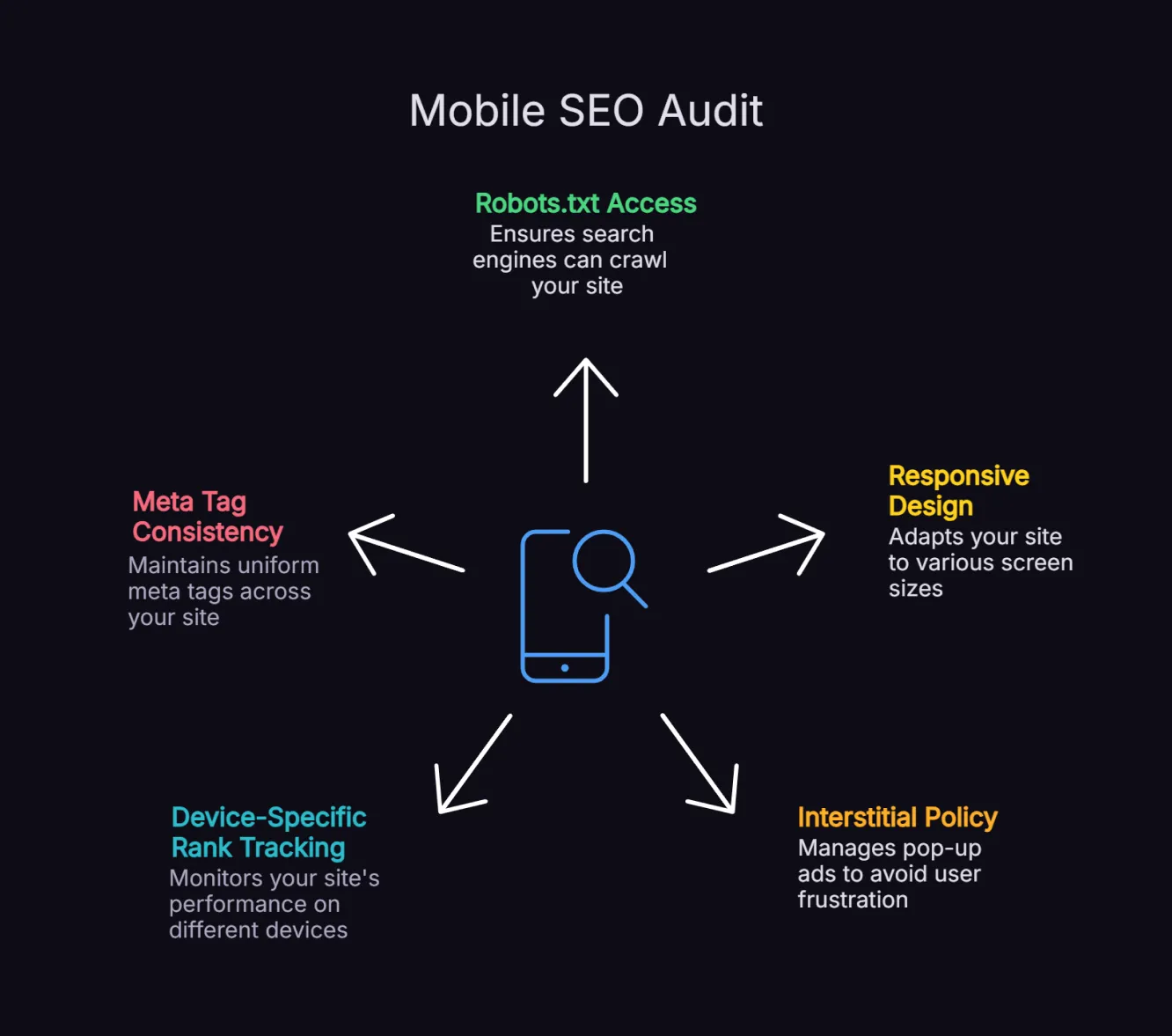
1. Blocking JavaScript or CSS in robots.txt
If Googlebot cannot access the scripts that render your mobile layout, it cannot accurately assess your mobile user experience. Ensure your robots.txt file allows Googlebot to crawl all JavaScript, CSS and image files.
2. Different URLs for Mobile and Desktop
Separate mobile sites (m. subdomains) create duplicate content issues, canonical tag complexity and crawl budget inefficiency. If you are running an m. subdomain, a migration to responsive design will almost always improve your mobile SEO performance.
3. Pop-Ups and Interstitials That Cover Content on Mobile
Google's intrusive interstitial penalty applies specifically to mobile, since full-screen overlays on small devices are significantly more disruptive than on desktop. Ensure any email capture or consent overlays do not block the main content.
4. No Separate Monitoring for Mobile Rankings
Only 11% of pages rank the same on desktop and mobile, but many businesses only track overall rankings. Set up device-specific rank tracking to identify mobile-specific visibility gaps and prioritise fixes.
5. Missing or Inconsistent Meta Tags on Mobile
Ensure your mobile pages carry identical meta titles and descriptions to your desktop versions. Inconsistent metadata between devices creates confusion for Google's indexing systems and reduces your eligibility for rich snippets on mobile.
Frequently Asked Questions About Mobile SEO
What is mobile-first indexing and how does it affect my rankings?
Mobile-first indexing means Google uses the mobile version of your website as its primary reference for ranking and indexing, rather than your desktop version. If your mobile site is missing content, structured data or internal links that appear on desktop, Google will not rank you for that content. Businesses that have not audited their mobile and desktop versions for parity often find their rankings are limited by issues they cannot see on desktop.
How do Core Web Vitals affect mobile SEO?
Core Web Vitals affect mobile SEO because Google uses them as part of its page experience signals. Poor LCP, INP or CLS can make a page slower, less stable and harder to use on mobile, which can weaken search performance. They are not a standalone ranking guarantee, so we treat them as a technical baseline alongside content quality, relevance, crawlability and mobile usability. In our audits, image issues are the most common cause of failing scores, with missing dimensions driving CLS and oversized files slowing LCP.
Does mobile page speed affect AI search citations?
Not on its own. Neither Google nor the major AI platforms publish evidence that fast mobile load times alone increase citation rates, so we do not claim a direct cause. What we can say from our own work is that a fast, technically healthy mobile site removes the barriers that stop pages being crawled, rendered and extracted. On one eCommerce engagement, fixing Core Web Vitals was a prerequisite for the work that earned 866 AI citations across ChatGPT, AI Overviews, AI Mode and Gemini, including 126 Google AI Overview citations and 12 ChatGPT citations within six months. Pages with poor performance scores were not being cited at all, so we treat mobile technical health as the foundation that makes citations possible, not a guarantee.
What is the difference between responsive design and a separate mobile site?
Responsive design uses a single URL and codebase that adapts to different screen sizes using CSS. Google recommends this approach because it is easier to manage, avoids content duplication and consolidates link equity to a single URL. Separate mobile sites (m. subdomains) require canonical tag management, create crawl budget challenges and often lead to content parity issues between versions. Unless there are specific business reasons for maintaining separate sites, responsive design is the right approach.
How do I check my site's mobile performance?
Google Search Console, PageSpeed Insights and Lighthouse are the three tools we reach for first, and each does a different job. Search Console gives you real-user (field) Core Web Vitals data and surfaces indexing, crawl and page experience issues through the Core Web Vitals and URL Inspection reports, so it is the best place to see what real visitors actually experience. PageSpeed Insights gives lab data with specific LCP, INP and CLS diagnostics and prioritised recommendations, which is what we use when deciding what to fix first. Lighthouse is best for repeatable, page-level diagnostics during development, including unreadable text, layout problems and tap targets that are too close together. We start with field data in Search Console, then use PageSpeed Insights and Lighthouse to diagnose the cause.
Mobile SEO Is the Foundation, Not the Finish Line
Mobile SEO is not a one-time project. It is the technical baseline that decides how your site performs in search, on mobile devices and across AI-assisted search experiences. When that foundation is strong, every content, CRO and SEO investment works harder, and as the eCommerce engagement showed, fixing the basics first can be what unlocks both revenue growth and AI citations. When it is weak, growth is harder to sustain.
About the Author
Want Insights Like This Fortnightly?

Our AI SEO strategies and tactics delivered fortnightly, including bonus trade secrets not shared anywhere else. No fluff. Just what's working right now. 5-minute read.


