
How to Audit Core Web Vitals: The Method Behind 91% Revenue Growth and 866 AI Citations


Most guides that explain how to audit core web vitals treat the process as a checklist. We treat it as a revenue exercise. When we audited an Australian eCommerce client's core web vitals, we found 590 oversized images and 982 images missing dimensions. After a six-week fix sprint, organic revenue grew 91% over the following eight months. That same engagement later reached about $1.75M attributed over 16 months, with 866 AI citations across ChatGPT, AI Overviews, AI Mode and Gemini. Adobe’s research shows how quickly AI-driven referral traffic is growing, with visits from AI-driven referrals increasing more than tenfold between July 2024 and February 2025. Pages that don't load fast aren't going to get picked up by that traffic at all. Here is exactly how we run the audit.
Audit Core Web Vitals in Four Words: Measure, Diagnose, Prioritise, Re-Test
Auditing core web vitals means measuring three Google-defined performance metrics. Largest Contentful Paint (LCP), Interaction to Next Paint (INP) and Cumulative Layout Shift (CLS), across your indexed pages, diagnosing the root causes of any failures, prioritising fixes by revenue impact, and re-testing after changes ship. Google uses these as ranking signals and AI platforms increasingly favour fast, stable pages when they choose what to cite.
Audit Your Performance Foundation Before You Write More Content
A slow site limits everything else you do. We help SaaS, eCommerce and B2B brands lift core web vitals as part of broader AI SEO campaigns. See how the Rankmax technical SEO consultant team builds performance into the audit, not as an afterthought.
View Technical SEO ServicesWhat Are Core Web Vitals (and Why They Matter for SEO and AI Search)
Core Web Vitals are three user-centric performance metrics Google introduced in 2020. They measure loading speed (LCP), interactivity (INP) and visual stability (CLS). Google confirmed they are ranking factors and apply them to both desktop and mobile.
For AI search the stakes are different. AI platforms have to fetch and process pages before they cite them. Slow or visually unstable pages drop out of the citation pool earlier than slow pages dropped out of the ten blue links, there is no second page in an AI Overview. Your core web vitals audit is now an AI SEO requirement, not just a Google one.
Unlike vanity metrics, core web vitals correlate with behaviour. Fast pages have lower bounce, higher time-on-page and better conversion. Auditing them improves the experience, the ranking and the citation rate together.
Largest Contentful Paint (LCP)
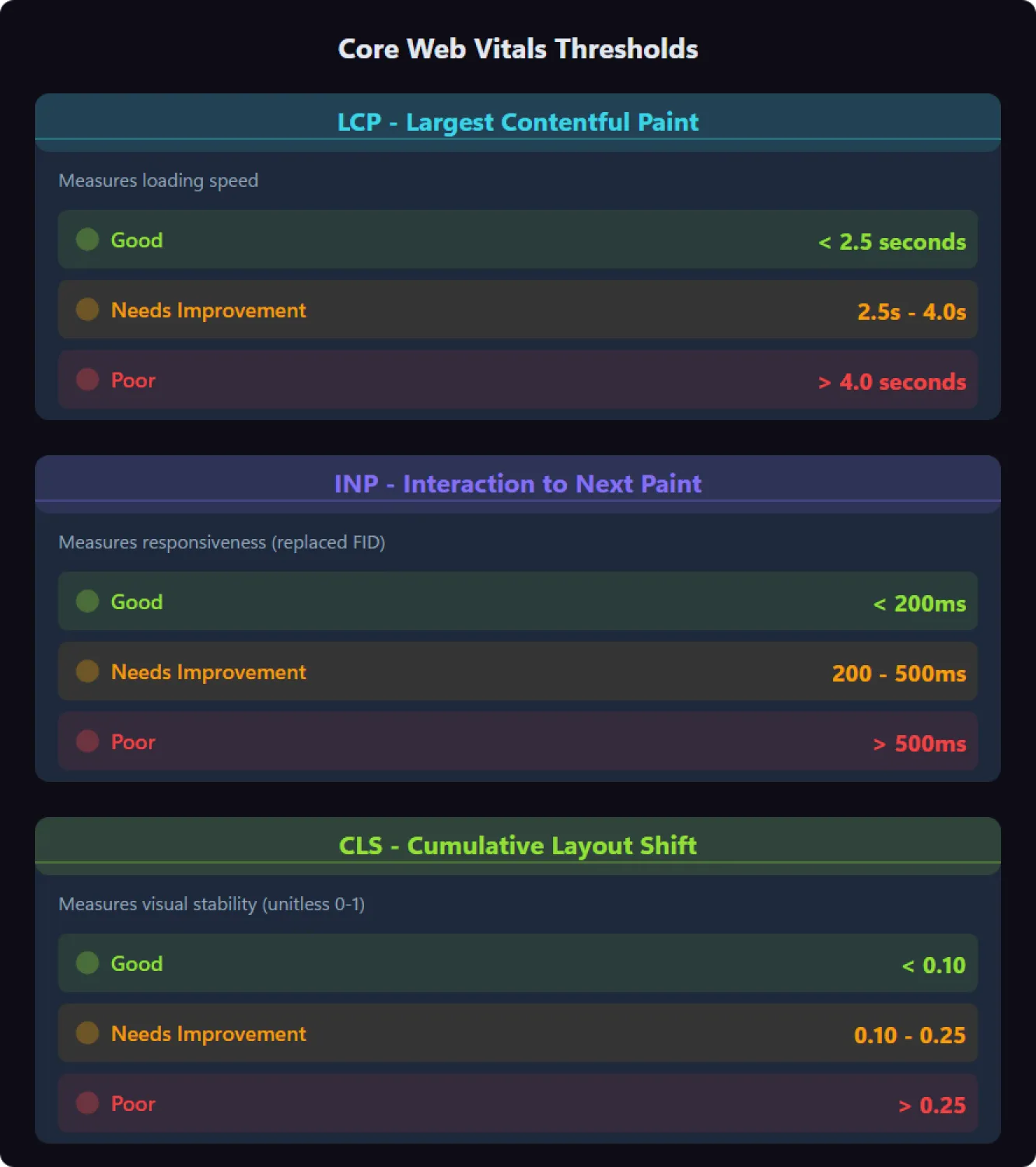
LCP measures how long the largest visible element on the page takes to render. That could be a hero image, a video thumbnail, a large heading or a text block. Google's "good" threshold is 2.5 seconds or less; anything above 4 seconds is "poor".
In practice LCP tells you whether the page feels fast. Poor LCP almost always traces back to unoptimised images, render-blocking JavaScript or slow server response times.
Interaction to Next Paint (INP)
INP measures the latency between a user input (click, tap, keystroke) and the page's visual response. Google's "good" threshold is 200 milliseconds or less. INP replaced First Input Delay (FID) as Google's official interactivity metric in March 2024.
Poor INP almost always means JavaScript is doing too much work on the main thread, particularly on pages with heavy interactive elements or long event-listener chains.
Cumulative Layout Shift (CLS)
CLS measures unexpected layout shifts during the page's lifetime, visible elements moving without user input, like an image loading late or an ad inserting itself into the layout. Google's "good" threshold is 0.1 or less.
CLS doesn't show up in raw loading-speed numbers but it ruins reading experience. Most CLS issues come from ads, third-party widgets or images and embeds with no declared dimensions.
What We Found When Auditing an eCommerce Client's Core Web Vitals
When we ran a full technical audit for an Australian eCommerce client, the Core Web Vitals issues were the worst part of the report. Here is what we documented:
- 590 images over 100KB that were directly responsible for poor LCP scores
- 982 images missing width and height attributes 100% of the site's images, driving most of the CLS problem
- A six-week sprint to compress images to WebP, add dimensions, restructure heading order and fix broken internal URLs
- 91% organic revenue growth within eight months of those fixes shipping
- Monthly organic revenue grew from $77,000 to $147,000 in that early eight-month window, then continued to about $1.75M attributed over 16 months
- 126 Google AI Overview citations and 12 ChatGPT citations within six months, pages that had previously had poor performance scores weren't being cited at all
- 866 AI citations across ChatGPT, AI Overviews, AI Mode and Gemini overall, with core web vitals fixes as the prerequisite
These aren't outliers. Most sites we audit have similar problems sitting in plain sight. The difference is whether they get found before or after they cost rankings and revenue. The full eCommerce AI SEO case study has the complete sprint-by-sprint breakdown.
Tools You Need for a Core Web Vitals Audit
Before you start, you need a toolkit that covers both lab data (controlled tests) and field data (real users). These are the six we use on every audit:
- Google Search Console: The Core Web Vitals report shows field data grouped by URL and status (good, needs improvement, poor) across mobile and desktop. This is your starting point on every audit.
- PageSpeed Insights: Runs Lighthouse for lab data and pulls CrUX field data for the same URL. The single most useful page-level diagnostic.
- Lighthouse in Chrome DevTools: For live debugging. The flame chart shows you exactly which operations are blocking the main thread; the filmstrip shows you when layout shifts happen.
- Screaming Frog SEO Spider: For the full-site crawl to identify which pages to test in PageSpeed Insights. The Lighthouse integration lets you run lab data at scale.
- Lighthouse CI: For catching regressions in your development workflow before they ship to production.
- SpeedCurve: For ongoing real-user monitoring at enterprise scale, with alerts when metrics degrade.
You don't need all six on a small site. For a 50-page brochureware site, Search Console, PageSpeed Insights and Lighthouse are enough. For enterprise-scale SEO audits, you may need the full stack.
How to Audit Core Web Vitals: Step-by-Step Process
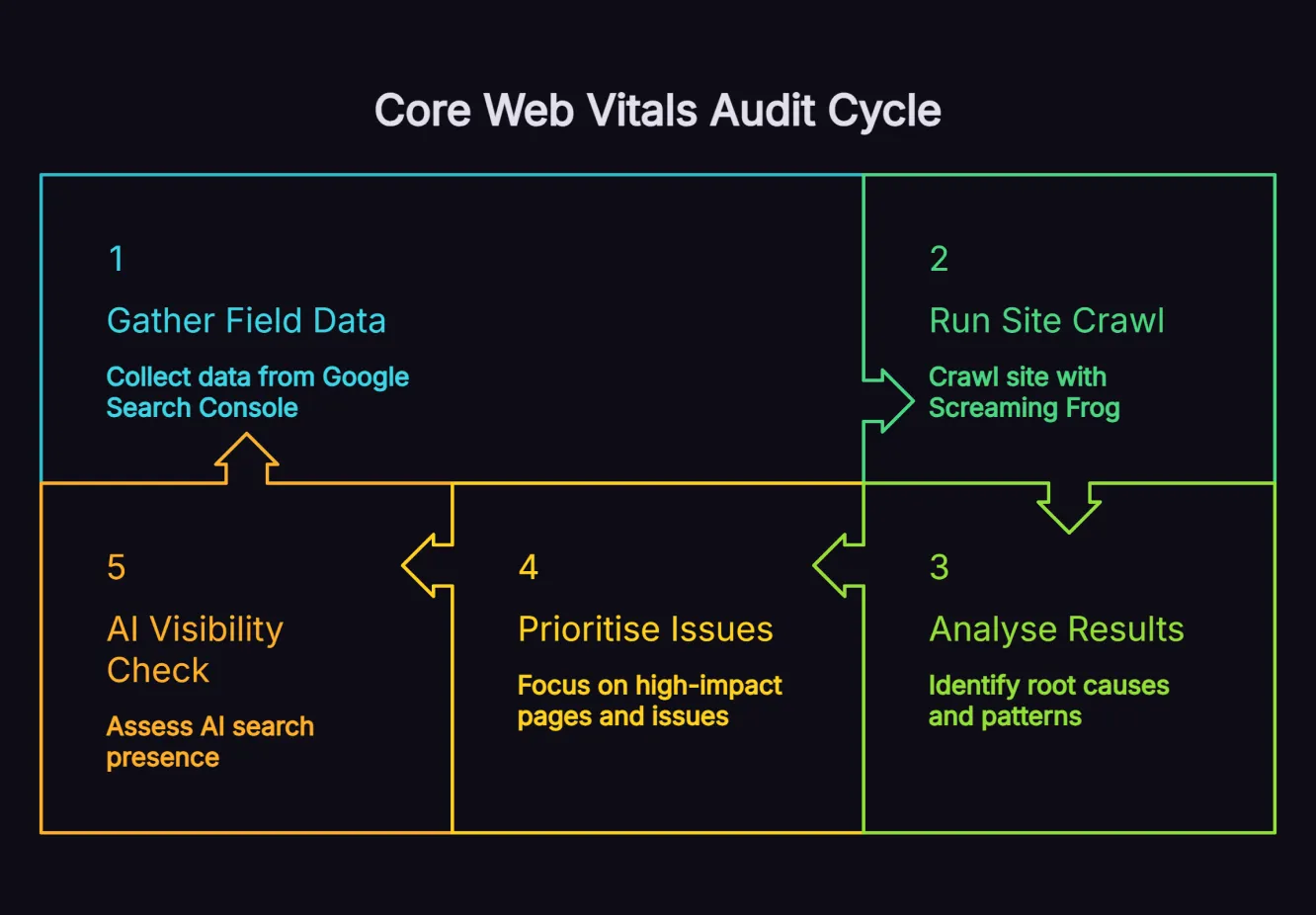
A proper core web vitals audit follows a structured methodology. Start with a high-level field-data assessment, dive into root-cause investigation on the worst pages, prioritise by business impact, and add an AI visibility spot-check that most audits skip.
Step 1: Gather Field Data from Google Search Console
Log into Google Search Console and open the Core Web Vitals report. Document three things from this report:
- The split between mobile and desktop status: Which surface is worse, and by how much?
- The pages or URL patterns flagged as "poor" or "needs improvement": Export these to a spreadsheet.
- The specific failing metric for each pattern: Is it LCP, INP, CLS or a combination?
This assessment tells you the scale of the problem and where to focus. It is also the only source of true field data Google's ranking algorithm uses.
Step 2: Run a Full Site Crawl with Screaming Frog
Crawl your entire site with Screaming Frog SEO Spider, then use the PageSpeed Insights API or manually test a representative 20-30 pages across templates and sections. Record LCP, INP and CLS for each page along with the issues PageSpeed Insights flags.
You'll start to see template-level patterns. Maybe all product pages have poor LCP from a single hero-image template. Maybe all blog posts have CLS issues from a single related-posts widget. Fixing template-level issues fixes thousands of pages at once.
Step 3: Analyse Results and Identify Root Causes
Group results by page type or template, then look for the pattern. Common culprits we see across audits include:
- Oversized images loaded without compression or modern formats like WebP or AVIF
- Images without declared width and height attributes that trigger layout shifts when they load late
- Render-blocking JavaScript loaded synchronously in the document head
- Slow server response times from uncached database queries or shared hosting limits
- Third-party widgets (chat, ad, social) injecting elements after first paint
- Web fonts loaded without font-display: swap causing flash-of-invisible-text
- JavaScript-heavy interactivity blocking the main thread during INP measurements
Use Chrome DevTools' Lighthouse panel and Performance tab to investigate individual pages. The flame chart tells you which operations are blocking; the filmstrip tells you when shifts happen.
Step 4: Prioritise Pages and Issues by Revenue Impact
Not all core web vitals problems matter equally. Prioritise by:
- Pages that drive the most organic revenue: Fix these first
- Pages with the highest impression volume in Search Console: The ceiling on traffic
- Pages competing in high-intent commercial queries: Where ranking is closest to a sale
- Issues affecting templates rather than individual pages: One fix, thousands of pages
Build a prioritised list with quick wins at the top and structural changes below. This is what separates a useful audit from one that gathers dust.
Step 5: Run an AI Visibility Spot-Check
This is the step most audits skip. Before you start the fix sprint, run the same set of pages through an AI visibility check:
- Pick five to ten of your priority pages from Step 4.
- Search the head term each page targets in ChatGPT, Perplexity, Google AI Overviews and Gemini.
- Record whether your page is cited, whether a competitor's is, and what the citation says.
Pages with poor core web vitals are routinely absent from AI Overview source panels and Perplexity citations. After the fix sprint, you re-run this spot-check and the citation pattern will move. On the eCommerce engagement above, this is how we tracked the 126 + 12 citation result. The spot-check defined the baseline so we could prove the lift.
How to Fix Common Core Web Vitals Issues
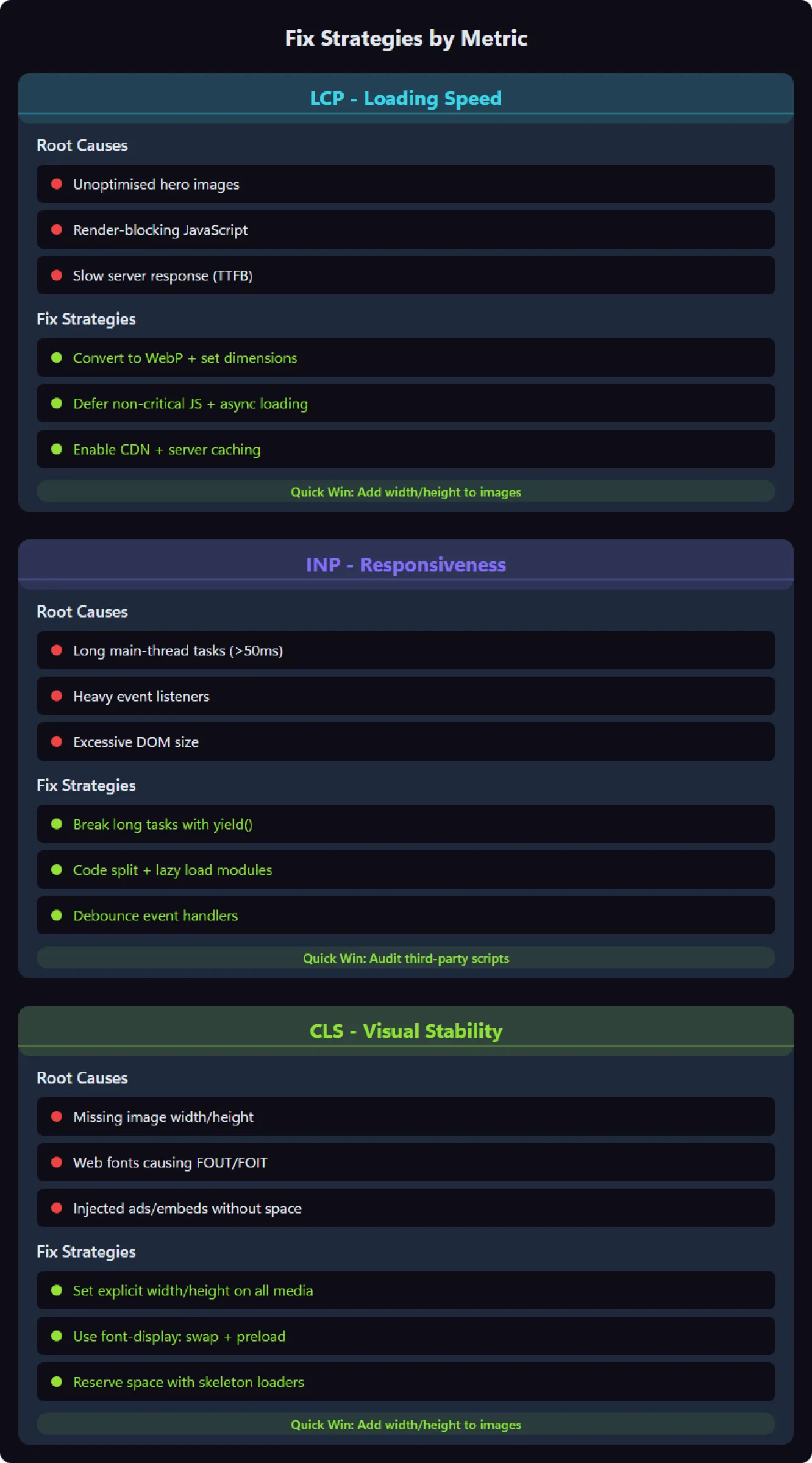
LCP, INP and CLS need different fixes. Knowing which metric is failing tells you where to spend developer time.
Fixing Largest Contentful Paint (LCP)
To get LCP below the 2.5-second threshold, focus on three areas:
- Image optimisation: Compress to WebP or AVIF, serve responsive sizes via srcset, and add fetchpriority="high" to the LCP image.
- Server response time: Cache aggressively, use a CDN, and verify Time to First Byte is under 600 ms.
- Render-blocking resources: Defer non-critical JavaScript, inline critical CSS, and remove unused third-party scripts.
On the eCommerce audit, the 590 oversized images were the single biggest LCP lever. Compressing them to WebP and adding correct dimensions did most of the heavy lifting.
Fixing Interaction to Next Paint (INP)
INP problems stem from JavaScript blocking the main thread. The strategies that work:
- Break long tasks into smaller chunks using requestIdleCallback or setTimeout boundaries.
- Code-split your JavaScript bundles so unused code doesn't ship to every page.
- Audit your event listeners and remove any that listen on too-broad a scope (document, window) when a narrower target would do.
- Defer non-critical third-party tags to after the page has settled, chat widgets, analytics enhancers, ad scripts.
The fastest JavaScript is JavaScript you never send. Audit your vendor.js bundle and remove libraries you imported once and forgot about.
Fixing Cumulative Layout Shift (CLS)
CLS fixes are usually the quickest to implement:
- Add explicit width and height attributes to every image and <video> element so the browser reserves space.
- Declare aspect-ratio for embeds and iframes via CSS so they don't change size after load.
- Set font-display: swap and preload key web fonts to reduce font-swap shifts.
- Reserve space for ad slots and dynamic content with min-height containers.
- Avoid inserting content above existing content unless the user triggered it.
When we audited the eCommerce client, 100% of their 982 images had no size attributes. That one issue caused most of their CLS problems. Adding width and height attributes site-wide eliminated the layout shifts within two weeks.
How Core Web Vitals Impact Search Rankings and AI Search Visibility
Google treats Core Web Vitals as part of its page experience ranking signals. In competitive verticals, pages with poor scores routinely get outranked by faster alternatives.
The AI search story is sharper. Adobe reported that AI-driven referral visits grew by more than 10x from July 2024 to February 2025. Across the campaigns we measure, visitors arriving from AI platforms convert at materially higher rates than equivalent organic traffic. If your pages do not load fast and render cleanly enough to be citation-ready, that AI-referred traffic is far less likely to reach you.
On the eCommerce engagement, the AI citation result wasn't a lucky outcome. The 126 Google AI Overview citations and 12 ChatGPT citations in six months arrived only after the core web vitals work was done. Pages with poor scores weren't being cited at all. The technical foundation was what unlocked the content's visibility.
What We See Across Audits: Three Verticals, Three Outcomes
Single-client case studies are easy to dismiss as one-offs, so here is the pattern across three different verticals where core web vitals were part of the same playbook:
- B2B (property management outsourcing): Technical improvements, including core web vitals fixes, combined with an AI-optimised content campaign now sit behind about $8.7M in attributed revenue over 27 months on an ongoing B2B engagement (earlier climb-window snapshots were lower). Full numbers in the B2B AI SEO case study.
- SaaS: A 12-month engagement combining technical fixes with AI SEO strategy generated $1.31M in organic revenue at 1,909% ROI, with monthly organic revenue lifting from $25,000 to $135,000. Full numbers in the SaaS SEO case study.
- eCommerce (the audit case above): 91% organic revenue lift in the first eight months (monthly revenue from $77,000 to $147,000 in that climb window), then continued to about $1.75M attributed over 16 months, plus 866 AI citations across ChatGPT, AI Overviews, AI Mode and Gemini. Full numbers in the eCommerce case study.
The technical work itself wasn't unusual. What was unusual was treating core web vitals as a prerequisite for AI citations rather than as a standalone SEO chore.
Enterprise-Scale Core Web Vitals Auditing
Large sites need a different approach. What works on a 50-page brochureware site doesn't scale to ten thousand product pages across multiple country domains.
For enterprise SEO, the essential components are:
- Continuous field-data monitoring via the Chrome User Experience Report (CrUX) API rather than spot-checking pages
- Lighthouse CI in your CI/CD pipeline to catch regressions before code reaches production
- Page-template-level testing rather than per-URL testing, fix the template, fix every page using it
- Performance budgets per template (e.g. blog post template: LCP ≤2.0s, INP ≤150ms, CLS ≤0.05) enforced in code review
- A named performance owner in the engineering team whose responsibility includes AI visibility, not just lab scores
Build a performance-first culture and core web vitals become a property you protect, not a problem you keep re-discovering.
Monitoring Core Web Vitals After Your Audit
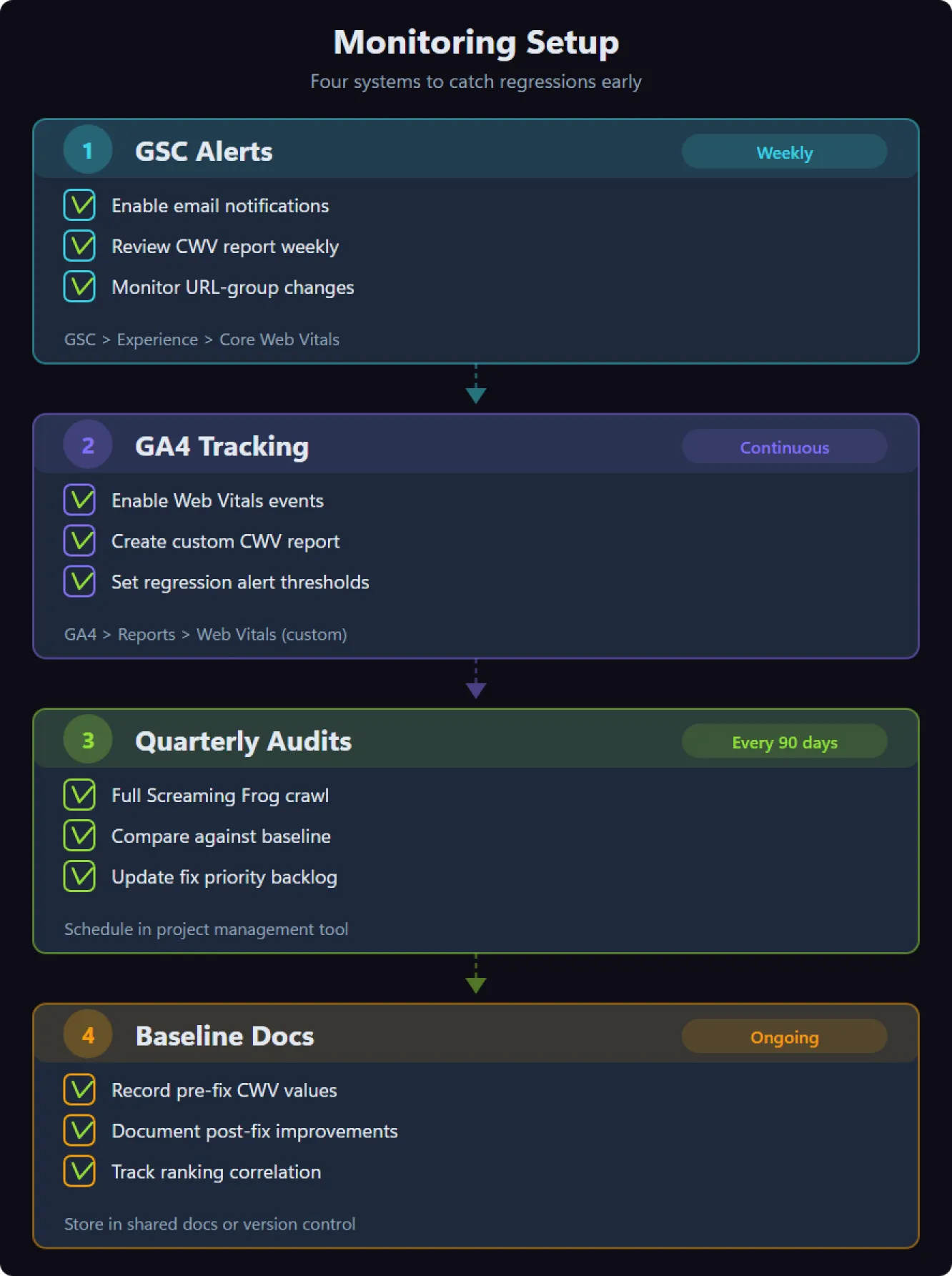
The audit is the start of the campaign, not the end. Set up these four monitoring systems to catch regressions before they cost rankings:
- Google Search Console alerts for the Core Web Vitals report, get notified when a page pattern moves to "needs improvement" or "poor"
- GA4 Web Vitals tracking via the official web-vitals JavaScript library, sending LCP, INP and CLS as custom events so you can correlate performance with revenue
- Quarterly Lighthouse audits on your top 50 revenue pages so lab data tracks alongside field data
- A baseline document stored alongside your audit that records the pre-fix score for every monitored page, without this, your team can't prove the lift to stakeholders
Share before-and-after metrics with the people who hold the budget. The clients we see sustain core web vitals improvements are the ones who treat the work as an ongoing campaign, not a one-time project.
Frequently Asked Questions
What’s the difference between lab data and field data?
Lab data (from Lighthouse) simulates a specific device and connection in a controlled environment. Field data (from the Chrome User Experience Report) comes from real browsers of real users on your pages. Both matter: lab data helps you debug a specific issue, field data reflects actual user experience and is what Google's ranking algorithm uses.
How often should I audit core Web Vitals?
Monitor continuously through Google Search Console and your analytics platform. Plan a full-site audit quarterly to catch regressions, validate that earlier fixes are still holding and re-run the AI visibility spot-check. A full audit typically takes us four to six weeks depending on site size and complexity.
Does my entire site need to pass Core Web Vitals?
Technically no, but you should aim to get as many pages as possible into "good" status. Pages that fail are less competitive in search and far less likely to be cited by AI platforms. we target at least 80% of pages in good status as a baseline standard before we count an engagement as healthy.
Do core Web Vitals affect AI search visibility?
Yes. AI platforms including ChatGPT, Perplexity and Google AI Overviews prefer citing pages that load fast and render cleanly. Poor performance creates a barrier to AI indexation. On the eCommerce engagement above, fixing core web vitals was the prerequisite that unlocked 866 AI citations across ChatGPT, AI Overviews, AI Mode and Gemini.
What’s the most common core Web Vitals issue?
From the audits we've run, missing image dimensions and unoptimised images are by far the most frequent culprits. They cause both CLS issues (layout shifts from missing width and height attributes) and LCP issues (slow loading from oversized files). Fixing images first typically delivers the biggest single improvement.
Can I fix core Web Vitals without a developer?
Some fixes are simple, compressing images or adding dimensions in your CMS. Others, optimising JavaScript execution or implementing Lighthouse CI, need developer time. Start with the fixes you can handle yourself and bring in a developer for the structural changes.
How long does it take to see ranking improvements after fixing core Web Vitals?
Google typically processes core web vitals changes within 28 days through the CrUX dataset, which updates monthly. Ranking improvements usually surface within one to three months after fixes ship, but the size of the move depends on how competitive your keywords are and how significant the underlying improvements were.
Should I prioritise mobile or desktop Core Web Vitals?
Both, but start with mobile. Google’s mobile-first indexing means your mobile experience is the primary version Google uses for indexing and ranking, and only 11% of tracked pages rank in the same position on mobile and desktop. That makes separate audits essential, because a blended view can hide major visibility gaps. Fix mobile first as the ranking baseline, then address desktop issues where they affect high-value revenue pages or conversion paths.
Audit, Fix, Then Re-Test for Citations
The pattern across every engagement is the same. Measure the metrics, find the template-level cause, prioritise by revenue, ship the fix, and re-test for both ranking and AI citation lift. Skip the AI spot-check and you'll never know what the fix unlocked. We have generated over $26M in client revenue using exactly this approach, with core web vitals as the technical foundation. team.
About the Author
Want Insights Like This Fortnightly?

Our AI SEO strategies and tactics delivered fortnightly, including bonus trade secrets not shared anywhere else. No fluff. Just what's working right now. 5-minute read.


