
How to Run an SEO Migration While Protecting Rankings and AI Citations


You have signed off a faster platform, a cleaner domain or a long-overdue redesign, everything looks sharper, and then organic traffic falls off a cliff two weeks after launch. That drop is the single biggest fear behind any SEO migration, and it is almost always avoidable. A migration moves your site, and a poorly planned one moves your rankings, your leads and your hard-won AI citations somewhere you cannot get them back. In this guide, I will walk you through how we plan, execute and monitor an SEO migration to protect the visibility Australian businesses have built across Google and AI search. There are no guarantees of zero movement, but the right process mitigates the downside and can turn a replatform into a growth event rather than a prolonged recovery project.
A Quick Guide to SEO Migration
An SEO migration is the work of planning and managing a major website change (new domain, platform, design or URL structure) to mitigate losses in search rankings, organic traffic and AI-search citations. Most of the protection happens before launch: benchmark performance, build a clean 1:1 URL map and ship permanent 301 redirects. Strong redirects and post-launch monitoring give the new site the best chance to stabilise quickly and improve beyond the old baseline. Skip them and a launch turns into a recovery project that can run for months.
Protect Rankings and Citations Through Your Migration
A migration can disrupt organic visibility you have spent years building, but it can also become the foundation for stronger growth. We handle benchmarking, 1:1 redirect mapping and post-launch monitoring to mitigate risk across Google rankings and AI citations. Talk to us before your build is locked in.
Talk to a Technical SEO ConsultantWhat SEO Migration Actually Means and Why Rankings and Citations Are at Risk
Most site owners use "migration" and "SEO migration" as if they mean the same thing, and the gap between them is exactly where traffic gets lost. Getting the definitions clear is the first step to protecting your performance through a move, so start here before you brief a single developer.
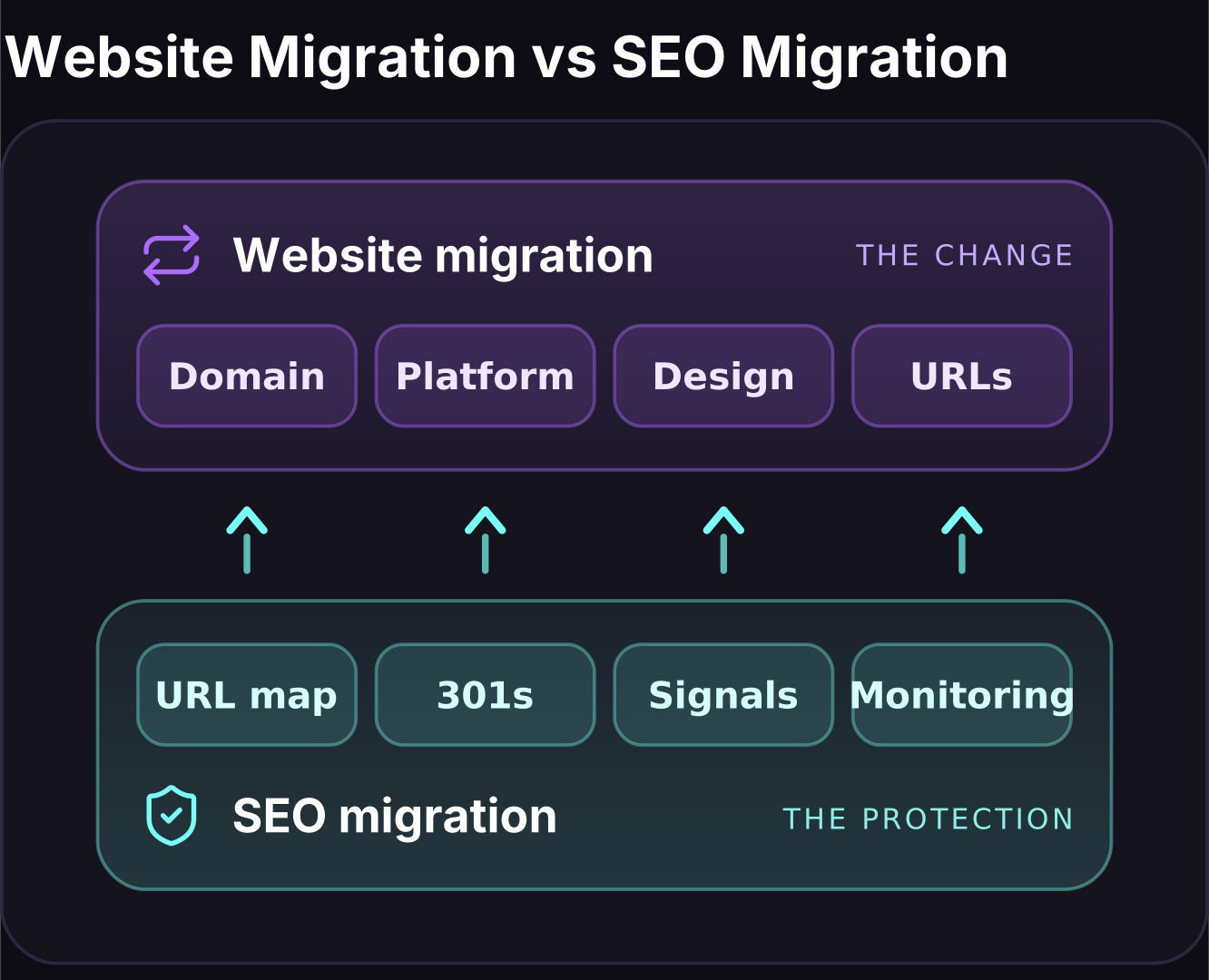
Website Migration vs SEO Migration
A website migration is any significant change to where your site lives or how it is built:
- A new domain
- A new content management system
- A redesign
- A change to your URLs
- A switch to HTTPS
An SEO migration is the discipline of managing that change while protecting the organic search performance attached to it. The website migration is the construction job. The SEO migration is the planning, mapping and monitoring that stop years of ranking equity from being demolished in the process. A developer can complete a flawless replatform and still trigger a traffic collapse if nobody mapped the old URLs to the new ones.
The two teams are optimising for different things: one for a clean build, the other for continuity of search signals.
The goal is to mitigate loss, not to promise that rankings, traffic or AI citations will never move. No SEO agency, developer or platform can guarantee a completely flat transition. Google still has to recrawl, reinterpret and re-index the new site, while AI systems have to retrieve and reassess the new URLs and passages.
That usually creates some reshuffling after launch. Rankings, organic traffic and citations can move during the first 30 to 90 days before the new signals settle. A clean migration shortens and limits that disruption; it cannot remove the underlying reprocessing from the equation.
The opportunity is that you do not have to settle for merely returning to baseline. A migration gives you a controlled moment to fix crawl waste, weak architecture, thin content, slow templates, broken internal links and citation-hostile page structure. When the website build and SEO migration are managed as one holistic project, the result can be stronger organic rankings and more AI-search citations than the site had before the move.
Why a Migration Puts Rankings and AI Citations at Risk
Search rankings are attached to specific URLs. When those URLs change, move or disappear, Google has to re-crawl, re-associate and re-trust the new addresses, and any break in that chain sheds rankings. The common failures we are called in to fix look the same again and again:
- Missing redirects: Old URLs return 404 errors instead of pointing Google to their replacements.
- Broken internal links: Menus and body links still point at old URLs that no longer resolve.
- Lost content: Pages that ranked well are quietly dropped or thinned during a redesign.
- Reset signals: A new domain or structure starts with less accumulated trust than the old one.
- Redirect chains: Old URLs bounce through several hops before reaching the final page, leaking signals along the way.
AI citations sit on top of the same foundation and add a second layer of risk. Platforms like Google AI Overviews, ChatGPT, Perplexity, Gemini and Copilot cite specific pages and specific passages. If a migration changes the URL that earned a citation, or restructures the passage an assistant was quoting, that citation can vanish even when the underlying ranking survives.
The stakes are not abstract: for a business doing meaningful revenue through organic search, a month of depressed rankings during a clumsy recovery is a month of pipeline gone. Handled well, though, a migration is a chance to fix years of structural debt in one move. One B2C compensation-claims client we rebuilt from a single-page site into a category leader went on to generate ~$14.6M in organic revenue over 21 months, where the rebuild was the launchpad, not the risk.
The Main Types of Website Migration
Not every migration carries the same risk, and knowing which type you are running tells you where to concentrate the technical SEO work. Most real projects combine two or three of the types below, which is what makes them harder to manage than a single clean change.
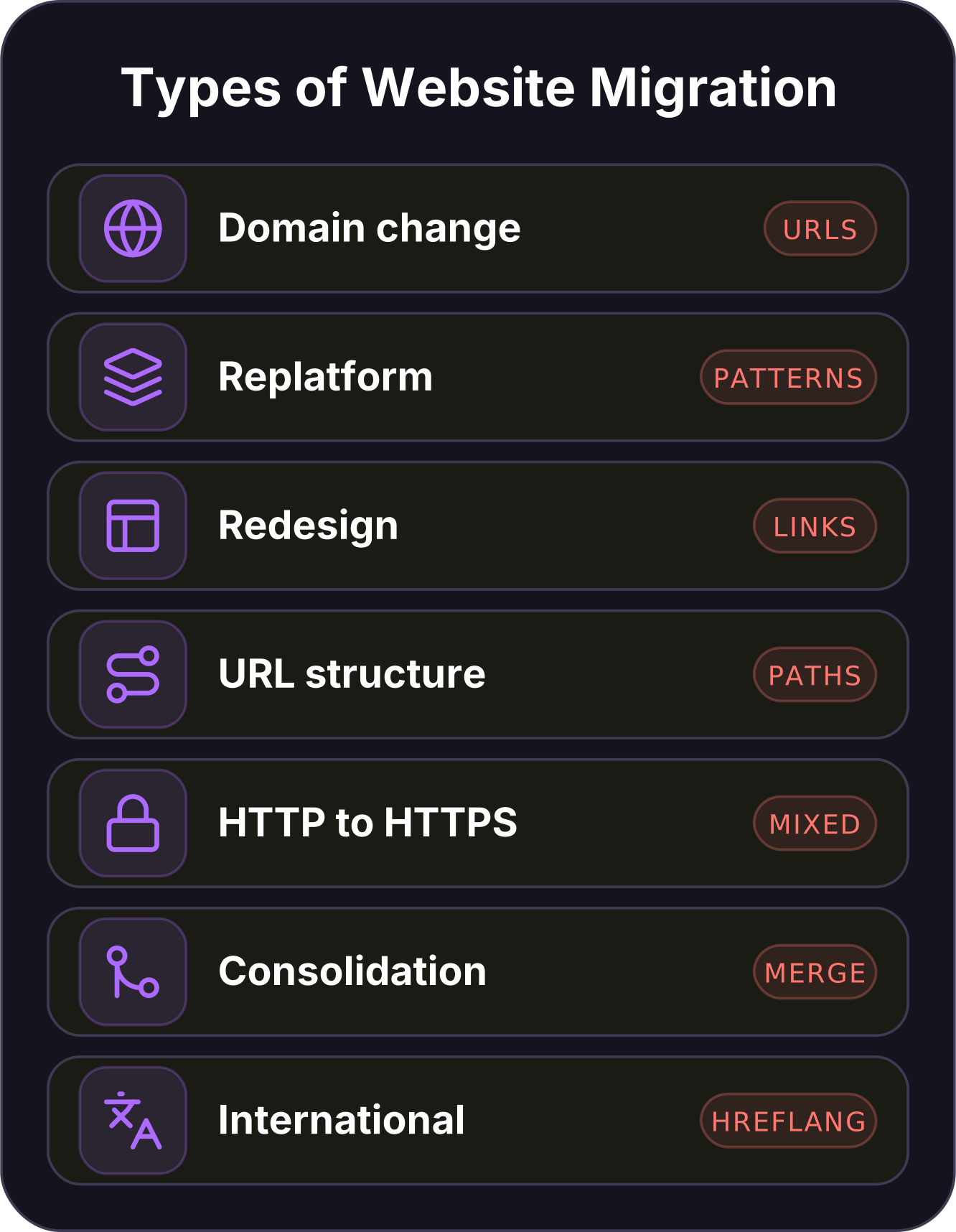
| Migration type | What changes | Main SEO risk |
|---|---|---|
| Domain change | The root domain (example.com.au to newbrand.com.au) | Every URL changes, needing full trust and equity transfer |
| Replatform | The CMS or platform (WooCommerce, Shopify, WordPress) | URL patterns, templates and page structure shift at once |
| Redesign | Layout, templates and on-page content | Content and internal links get thinned or reworked |
| URL-structure change | Folder paths, slugs or category logic | Large-scale redirect mapping across many URLs |
| HTTP to HTTPS | The protocol only | Redirect and canonical errors, mixed-content issues |
| Consolidation | Two or more sites merged into one | Overlapping content, redirect chains, duplicate signals |
| International | Country or language versions, ccTLDs | Hreflang, geotargeting and localised content mapping |
A replatform is the type most Australian businesses face, usually a move between WooCommerce, Shopify and WordPress as the store or content library outgrows its original setup. These projects are high-risk because the platform determines URL patterns, templates and often internal linking. One decision in the new build can rewrite thousands of addresses.
If you are considering a migration to Webflow, we recommend involving 224 Industries, our preferred Webflow website design and development partner. Bringing the design, development and SEO teams together before the build is the safest way to prevent late structural decisions from damaging search performance.
The other migration types each have their own trap. A domain change resets every URL you own and needs a full Change of Address filing. An HTTP to HTTPS move looks trivial but routinely leaves mixed-content warnings and canonical tags pointing at the old insecure URLs.
A redesign can be the quiet killer because it changes content and internal links even when URLs stay the same. Thinning a page that used to rank can be enough to lose the ranking.
A URL-structure change is primarily redirect-mapping work, where a careful spreadsheet is safer than an overbroad rule. A consolidation produces the messiest maps because overlapping pages need to be merged rather than simply moved.
Whichever combination you are running, the technical SEO foundation has to survive the move intact. That starts with knowing exactly what you have before you touch anything.
Pre-Migration Planning and the Audit That Prevents Disaster
When we open a migration engagement, the first phase is entirely preparation, because everything that protects your rankings is decided before a single URL changes. A migration you have benchmarked and mapped is recoverable. One you launched blind is not. We work through the following sequence before any build goes live.
- Set your goals and KPIs first: Define what success looks like (hold rankings, hold organic revenue, hold AI citations) and the exact metrics you will judge the launch against.
- Benchmark analytics and rankings: Record current organic sessions, conversions, revenue and keyword positions so you have a clean "before" picture to compare against.
- Run a full crawl of the live site: Capture every indexable URL, its status code, title, canonical and internal links, so nothing is lost in translation.
- Complete an SEO audit: Identify your top pages by traffic, revenue and links, plus the technical issues you want fixed rather than carried across.
- Take a full backup: Keep a complete copy of the old site and its database so you can reference or restore it if anything goes wrong.
- Build a staging site with indexing blocked: Develop the new site behind a noindex or password so Google never crawls or indexes the unfinished version.
The crawl is the backbone of the whole project. We run it with Screaming Frog to export a full inventory of live URLs. We benchmark keyword positions and organic visibility in Semrush so any post-launch movement is measured against real numbers, not memory. Benchmark over a stable, representative window rather than a single week. Ordinary seasonal noise does not later masquerade as a migration effect when you compare the two periods.
Pair that crawl with a proper technical SEO audit and you know precisely which pages carry your traffic, which carry your links and which can be safely retired.
Two parts of this phase are quietly the most valuable. The first is deciding what to keep and what to retire. A migration is the rare moment when you can prune thin, duplicate or outdated pages without disrupting a stable site. Doing it deliberately beats carrying dead weight across.
The second is stakeholder alignment. Developers, designers and the marketing team need to agree that the URL map and redirect rules are non-negotiable. The most damaging migrations we see are the ones where a designer changes the URL structure late in the build and nobody tells the SEO side.
The staging step matters more than teams expect. An unblocked staging site can get indexed, split signals across duplicate URLs and confuse Google about which version is real. The indexing block is not optional.
URL Mapping and Your 301 Redirect Strategy
The redirect map is the single document we spend the most time on, because it is what carries your rankings from the old site to the new one. Every URL that has ever earned a ranking, a link or a citation needs a deliberate destination, and guesswork here is what produces the two-week traffic cliff. This is the core of any successful SEO migration.
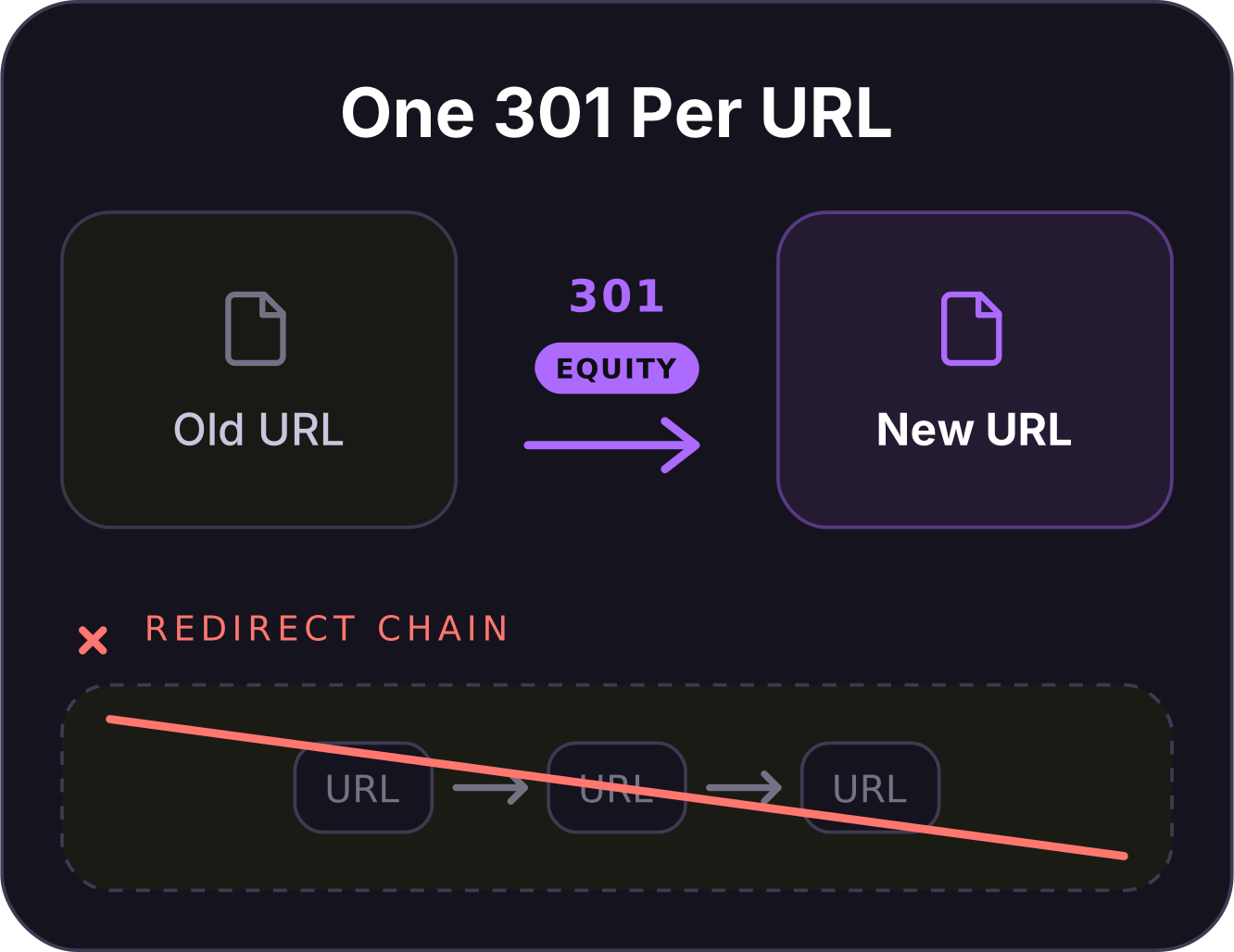
The rule is a 1:1 map: each old URL points to the single most relevant new URL, matched on search intent, not redirected in bulk to the homepage. A batch of old product pages sent to the homepage tells Google those pages are gone, and their rankings go with them. This is where keyword mapping earns its place in the process.
Matching old URLs to new ones by the intent each page serves is exactly the same discipline as mapping keywords to pages.
Redirect every mapped URL with a permanent server-side redirect. Google is explicit that 301 redirects and other permanent redirects (including 308) are the strongest signal that the new URL should be treated as canonical and shown in search results in place of the old one. Temporary redirects and meta-refresh or JavaScript methods are weaker and slower for Google to interpret. Once the map is built, a few rules keep it clean:
- Map one to one on intent: Send each old URL to its closest equivalent, never a bulk redirect to the homepage.
- Avoid redirect chains: Point old URLs straight at the final destination, since Googlebot only follows a limited number of hops in a chain and every extra hop slows how quickly Google reprocesses the move.
- Preserve link equity: Redirect the pages that hold your best backlinks to a genuinely equivalent page so their authority carries across.
- Keep redirects live for the long term: Leave them in place for at least a year so Google fully reprocesses the move, per its site move documentation.
The edge cases are where maps quietly fail. Paginated series, faceted and parameter URLs, filtered category views and discontinued products all need a rule, not an oversight. A discontinued product with backlinks and rankings should redirect to its parent category or nearest replacement, not to a dead 404 and not to the homepage.
When you consolidate several old pages into one stronger new page, that is a deliberate many-to-one redirect, and it is fine as long as the destination genuinely covers what those pages did. Build the full map in a spreadsheet, one row per old URL, with its new destination, its status code and its priority based on traffic and links.
A worked example makes the pattern clear: an old blog URL such as /blog/2019/seo-tips redirects with a single 301 to its new home at /articles/seo-tips. A dozen thin, near-duplicate location pages that now sit under one stronger hub become a deliberate many-to-one redirect to that hub. Name a rule for every pattern on the old site and no URL is left to guess its own destination.
Backlinks are the part teams forget. Before launch we pull the full backlink profile in Ahrefs and flag the highest-authority external links. Those pages are redirected with care and, where it is worth it, we reclaim them by asking the referring site to update the link directly. Those external links are your off-page authority, and a redirect chain or a lazy homepage redirect quietly leaks the equity you paid years to build.
Test the entire map on staging before launch by running your old-URL list against the redirect rules, so you catch a broken or looping redirect while it costs nothing.
Preserving Technical SEO Through the Move
Redirects protect your URLs, but a migration touches every other technical signal Google and AI platforms rely on, and each one has to be rebuilt correctly on the new site. These are the elements we check line by line before and after launch.
Internal Links, Sitemaps and Robots
Internal links should be updated to point at the new live URLs directly, not left to pass through redirects. A menu full of redirected links wastes crawl budget and slows the whole move down. Generate a fresh XML sitemap containing only the new canonical URLs and remove the old one, so Google is handed a clean map of the new site.
Review the new robots.txt carefully: the most common launch-day disaster is a staging "Disallow: /" or a blanket noindex left in place. That tells Google to ignore the entire site the moment it goes live. It sounds obvious, and it is still the fault we find most often when a brand-new site drops out of the index within days.
Canonicals and Structured Data
Every page needs a self-referencing canonical tag pointing at its own new URL, so Google is never confused about which version to index. Mismatched canonicals, where a new page points its canonical at an old or wrong URL, quietly tell Google to ignore the page you just built. Any structured data on the old site (product, article, FAQ, organisation and breadcrumb markup) has to be carried across to the matching new templates.
Schema is part of how both rich results and AI systems read and cite your pages. Losing it in a redesign is a silent downgrade that rarely shows up until citations start slipping.
Analytics, Tracking and Search Console
A migration moves your measurement stack as well as your pages, and losing sight of performance at the moment you most need to watch it is a self-inflicted wound. Carry your analytics across before launch: confirm the tracking code and conversion events fire on every new template, that goals and ecommerce tracking still map to the right actions and that nothing in the new consent setup silently blocks measurement.
Add and verify the new site as a property in Google Search Console ahead of time so you have data from hour one. Annotate your analytics with the launch date so the before-and-after line is unmistakable. If tracking breaks on launch day you lose the very visibility you need to catch a ranking or citation problem early, which turns a small issue into a slow one.
Hreflang for International Migrations
If your migration touches international or multi-language versions of the site, hreflang is the highest-risk technical element you will handle, and it is unforgiving of small mistakes. Google requires every language version to reference itself and every other version, a set of localised versions that must all point back at each other. A single broken return tag can invalidate the whole cluster. This is not a rare problem.
Across real enterprise multi-market audits we have found 2,402 broken hreflang URLs in a single engagement, the kind of decay a replatform makes far worse if the annotations are regenerated carelessly. Map your hreflang relationships before launch and validate them after, template by template.
Do Not Let a Redesign Wreck Core Web Vitals
A new design often ships heavier than the old one, and page speed is a ranking and user-experience signal you do not want to trade away. Google measures three Core Web Vitals thresholds: Largest Contentful Paint under 2.5 seconds, Interaction to Next Paint under 200 milliseconds and Cumulative Layout Shift under 0.1. Test the new templates against those numbers on staging and fix regressions before launch rather than after.
A structured Core Web Vitals audit on the staging build catches the heavy hero images and layout shifts while they are still free to fix.
Launch-Day Execution
Launch day is where preparation either pays off or unravels, and the order of operations matters. A calm, sequenced go-live beats a rushed one every time. This is the runbook we follow when a migration goes live.
- Pick a low-traffic window: Schedule the switch for your quietest period so any teething issue affects the fewest users and you have time to react.
- Lift the staging block: Remove the noindex tag or robots.txt disallow that kept the staging site private, and confirm the live site is now crawlable.
- Verify status codes: Check that live pages return 200 and every old URL returns a single 301 to the correct destination, with no 404s or 500s in the set.
- Test the redirects at scale: Crawl your full list of old URLs and confirm each one lands on the right new page in one hop, not a chain.
- Submit the new XML sitemap: Upload the clean sitemap in Google Search Console so Google can start discovering the new URLs immediately.
- File a Change of Address (for a domain move): If you have moved domains, use the Search Console Change of Address tool to tell Google the old domain has permanently moved.
Before you flip the switch, hold a short go or no-go check with the developer, the SEO lead and whoever owns the launch. Confirm the backup is current, the redirect rules are deployed and the staging block is ready to lift. Resist the urge to ship other big changes in the same window, because a new design, a domain move and a content overhaul launched together make any drop impossible to diagnose.
Change one major thing at a time wherever the roadmap allows. Brief your team and any client-facing staff that the site is moving, so nobody panics at the first wobble in the numbers. Assign one person to watch server logs and Search Console through the first 24 to 48 hours so you catch a crawl error, a redirect loop or a spike in 404s while it is still small. A migration is never "done" at launch.
It is done once you have confirmed Google is crawling the new URLs cleanly and the redirects are all firing as intended.
Post-Migration Monitoring and Traffic-Drop Recovery
The first 30 to 90 days after launch decide whether a migration holds, and this is the window where fast diagnosis separates a minor dip from a lasting loss. Some short-term fluctuation is normal as Google reprocesses the move, so the skill is telling ordinary settling apart from a real problem, then acting quickly when it is the latter.
What to Watch in the First 90 Days
Track a tight set of metrics daily at first, then weekly:
- Rankings: Watch your benchmarked keyword positions for drops, especially on your highest-revenue pages.
- Organic traffic and revenue: Compare sessions, conversions and revenue against the pre-launch benchmark, not against last week.
- Crawl stats and index coverage: Check Search Console for crawl errors, a falling indexed-page count or a spike in "not found" URLs.
- 404s and redirects: Keep hunting for old URLs that slipped the map and now return errors.
- AI citations: Confirm the pages that were being cited are still resolving and still hold the passages that earned the citation.
If Traffic Drops, Here Is How We Diagnose It
When traffic falls after a migration, the cause is almost always mechanical and fixable. We work through the usual suspects in order:
- Missing or broken redirects.
- Redirect chains that dilute signals.
- An accidental sitewide noindex or robots block carried over from staging.
- Canonical tags pointing at the wrong URLs.
- Pages that were thinned or dropped in the redesign.
The fastest way in is to re-crawl the new site, cross-reference it against your pre-launch URL inventory and look for old URLs that now return anything other than a clean single redirect. A sudden, sitewide drop within days almost always points to a crawl-blocking error like a stray robots disallow, while a slower, page-by-page slide usually points to weakened content or lost internal links.
Where the drop traces back to weakened content rather than a technical fault, a targeted content refresh on the affected pages rebuilds the depth and internal links Google expects to see. Most post-migration recoveries are won by fixing the redirect map and restoring lost content, not by starting again.
Speed matters most in the first week, but patience matters after it. Once the redirects and blocks are confirmed clean, use Search Console to request indexing for your highest-value pages so Google re-crawls them sooner. Give the rest of the site time to settle rather than making further changes that muddy the signal. Keep the backlink reclamation going in parallel, because the referring sites you flagged before launch will not update their links on their own.
A short outreach pass in the weeks after go-live recovers equity that would otherwise sit behind a redirect. Hold your redirects and your nerve and most sites are back to baseline well inside the 90-day window.
Preserving AI-Search Citations Through a Migration
This is the layer almost no migration guide covers, and it is where a modern SEO migration separates itself from a 2019 one. AI search platforms do not just rank pages, they cite them, and those citations are exposed to migration risk in ways rankings alone are not. Protecting them is now part of the job, not an extra.
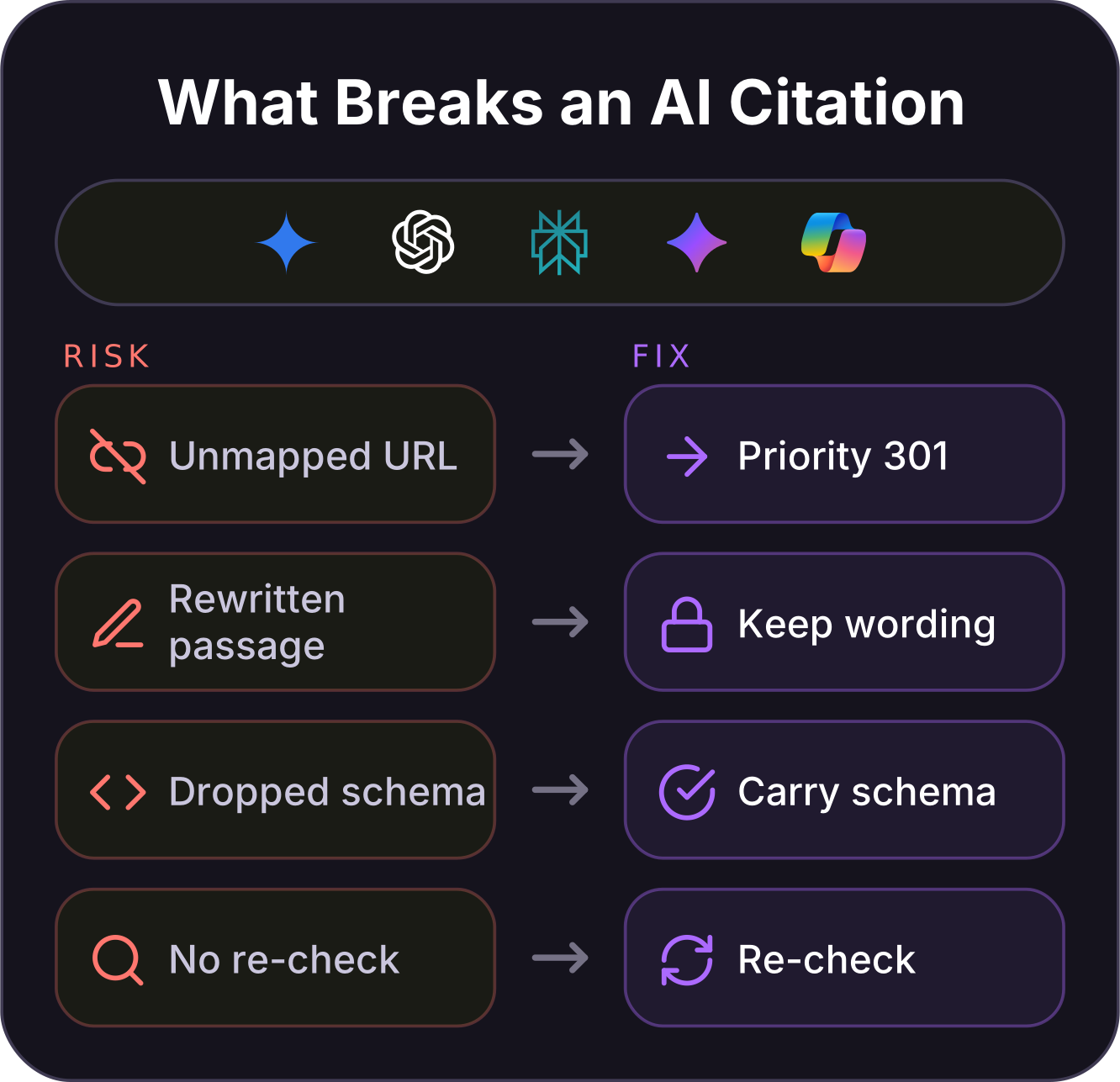
Google AI Overviews, ChatGPT, Perplexity, Gemini and Copilot answer questions by retrieving and quoting specific pages and specific passages. That means two things can break a citation during a migration even when the ranking survives. The URL that earned the citation might change without a clean redirect, or the passage the assistant was quoting gets reworded, reformatted or buried in a redesign.
Understanding how AI search works makes the protection obvious, because the passages that get cited are simply the ones that answer a real question cleanly, and a migration must not break them.
Our approach protects both rankings and citations at the same time, because they share the same foundation:
- Redirect cited URLs with priority: Identify the pages already earning AI citations and treat their redirects as non-negotiable one-to-one moves.
- Preserve the winning passages: Keep the exact question-and-answer structure, headings and wording that earned citations, rather than rewriting them in a redesign.
- Carry schema across: Keep FAQ, article and product markup intact so AI systems can still parse the page.
- Re-verify after launch: Check across the major platforms that your citations still resolve, and re-earn any that slip.
Re-earning a citation is not the same as restoring a ranking, and it helps to know why. AI assistants build their answers from whatever they retrieve at the time of the query. A page that has moved cleanly and kept its answer intact tends to be picked back up, while a page whose passage was rewritten in a redesign may have to prove itself again from the start.
The practical lesson is a conservative one: change the address if you must, but do not rewrite the answer that was working at the same time. Change two variables at once and you lose track of which one cost you the citation.
AI citations are a visibility KPI in their own right and a leading indicator that revenue is coming, tracked alongside your rankings rather than in place of them. Because AI platforms recrawl and re-form their answers on their own schedule, a lost citation may take longer to notice than a lost ranking. That is why we spot-check the pages that matter across the major assistants in the weeks after a move rather than assuming silence means success.
For one B2B property-management client we monitor 138 AI citations as closely as their keyword positions. Through any change to those pages the goal is the same: protect the rankings and the citations together, because losing either one costs visibility you have already paid for.
Australia-Specific Migration Considerations
A migration run for an Australian audience has factors a generic global guide skips. They are the difference between a launch that holds locally and one that quietly loses ground in your home market. These are the AU-specific details we build into every plan.
Google Business Profile and the Local Pack
If you rank in the local pack or Google Maps, your migration is not finished when the website switches over. Update the website URL on your Google Business Profile the moment the new site is live. Check that your name, address and phone number stay consistent across your profile, local directories and the site itself. Local citations that still point at old URLs weaken the signals that hold your local pack position.
Include your top directory listings, aggregators and industry bodies in the same update pass you use for the site. For a business that draws real revenue from local search, this step is as important as the redirect map. If you rely on Google reviews, confirm the profile stays verified and connected through the move, since a disrupted profile can drop the reviews and rating that feed your local visibility.
The .com.au Domain, DNS and Hosting
A .com.au domain is a geotargeting signal to Google that your business is Australian, so keep it wherever possible rather than consolidating onto a .com and giving up that local relevance. When you move hosting or DNS, plan for propagation: lower your DNS TTL a day or two before the switch so changes take effect quickly. Keep the old server live until the new one has fully propagated so no user hits a dead site mid-move.
Choose hosting that serves Australian users fast, since server response time feeds directly into your Core Web Vitals and rankings. A cut-price offshore host can add latency that a local audience feels on every page load. A content delivery network with Australian points of presence smooths this out for national brands, and it is worth confirming the new host has not quietly changed your IP geolocation away from Australia.
Timing the Move for the Australian Calendar
The Australian market is smaller than the northern-hemisphere ones many playbooks assume, which means a badly timed launch is felt quickly and there is less slack to hide a dip. Launch timing should follow the local calendar, not a northern-hemisphere one:
- Avoid the end of the financial year: The June EOFY peak is the worst time to risk trading visibility for eCommerce and services alike.
- Steer clear of the retail rush: Keep migrations away from the November and December Black Friday and Christmas trading window.
- Use the AEST quiet hours: The lowest-traffic window for most Australian sites is the early hours of the morning AEST, which is the safest slot to go live.
Timeline, Cost and Rollback Planning
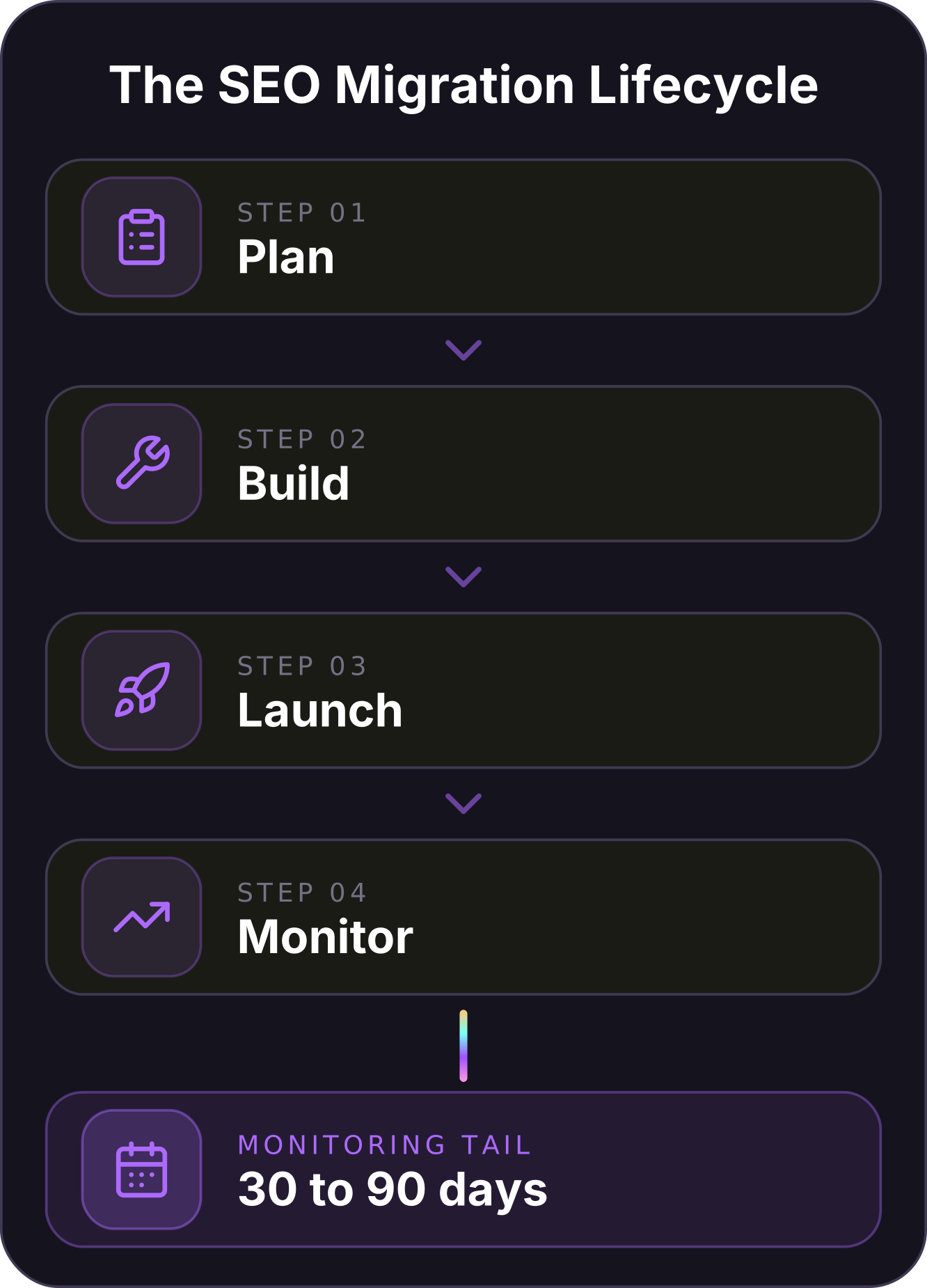
The last piece is planning for how long the move takes, what drives the cost and what happens if it goes wrong, because a migration without a rollback plan is a gamble. Setting these expectations up front is what keeps a migration a business decision rather than a scramble.
Timelines scale with complexity. A small brochure site can be planned, mapped and launched in a few weeks. An enterprise store with tens of thousands of URLs and multiple combined migration types can run for several months of preparation before go-live. The phases stay the same regardless of size:
| Phase | Key actions |
|---|---|
| Plan | Set KPIs, benchmark rankings and revenue, crawl the live site, run the SEO audit |
| Build | Develop on blocked staging, build the 1:1 URL map, prepare redirects and sitemaps |
| Launch | Go live in a low-traffic window, verify status codes, submit sitemap, file Change of Address |
| Monitor | Track rankings, traffic, crawl errors and AI citations across the first 30 to 90 days |
Cost is driven by the number of URLs, the number of migration types you are combining and how much technical cleanup the old site needs, not by any fixed price. The figure that matters most is rarely the project fee, it is the revenue you lose during a botched recovery, which is exactly what careful planning is designed to prevent.
Before any go-live we agree a rollback plan so a bad launch can be reversed in minutes, not debated for hours:
- Keep the old site recoverable: Hold the full backup and the ability to restore the previous site if the new one fails on launch.
- Keep DNS reversible: Leave the old environment live and DNS changes easy to roll back until the new site is proven stable.
- Set go or no-go criteria: Agree in advance the error thresholds that would trigger a rollback rather than a fix-forward.
- Retain the old domain: Never let the previous domain lapse, so its redirects and residual equity stay under your control.
Define your success KPIs before you start and give one person clear ownership of the migration end to end. That gives you both an objective way to judge whether it worked and someone accountable for the calls on launch day.
It pays to write the whole plan down as a single migration runbook: the URL map, the redirect rules, the launch-day sequence, the rollback triggers and the owner of each step. A migration pulls in developers, designers, marketers and often an external agency at once, and the runbook is what keeps them working from the same page rather than discovering conflicting assumptions at go-live.
Treat it as the source of truth, keep it updated as the build changes, and the launch becomes a checklist to work through instead of a leap of faith.
Frequently Asked Questions
These are the questions we field most often once a migration is on the table, from first-time movers and seasoned marketing teams alike.
What is the difference between a website migration and an SEO migration?
A website migration is the technical change itself, such as a new domain, platform, design or URL structure. An SEO migration is the planning, URL mapping, redirecting and monitoring designed to mitigate losses in rankings, organic traffic and AI citations while the new site is recrawled and reassessed. You can complete a website migration perfectly and still lose your search performance if the SEO side was never planned.
Does a website migration hurt my SEO rankings?
It does not have to. A well-planned migration with a clean 1:1 redirect map, preserved content and careful monitoring usually holds rankings, with only short-term fluctuation while Google reprocesses the move. Rankings are lost when URLs change without redirects, when redirect chains dilute the signals passing to the new pages or when content is thinned or dropped in a redesign.
Why did my organic traffic drop after a migration?
Post-migration drops are almost always mechanical. The usual causes are missing or broken redirects, a sitewide noindex or robots block accidentally carried over from staging, redirect chains, wrong canonical tags or pages that were removed or thinned in a redesign. Crawl the site, compare it against your pre-launch benchmark and the fault is usually quick to isolate and fix.
Do I need a 301 redirect for every page?
You need a redirect for every old URL that has value: pages with rankings, backlinks, traffic or AI citations. Each should point with a permanent 301 to the single most relevant new page, matched on intent rather than sent to the homepage. Truly worthless URLs with no links or traffic can be allowed to return a 404, but when in doubt, redirect it to its closest equivalent.
How long does an SEO migration take, and how long to recover?
Planning and launching a migration can take a few weeks for a small site or several months for a large one. After launch, expect some reshuffling while Google recrawls and re-indexes the website and AI systems reassess its pages.
Many well-managed sites settle within 30 to 90 days, but there is no guarantee of zero traffic, ranking or citation loss. Mapping errors can extend recovery considerably. Strong preparation mitigates the downside and creates the opportunity to improve beyond the old baseline.
When is the best time to launch a site migration in Australia?
Launch in a low-traffic window and avoid your busiest trading periods. For Australian businesses that means steering clear of the June end-of-financial-year peak and the November-to-December retail rush, and going live in the quiet early-morning hours AEST. A quieter window means fewer affected users and more time to catch and fix any issue before it reaches scale.
How do I preserve AI Overview and ChatGPT citations during a migration?
Treat the pages already earning citations as priority redirects, and keep the exact passages, headings and structured data that earned those citations rather than rewriting them in a redesign. AI platforms cite specific URLs and passages, so an unmanaged URL change or a reworded answer can drop a citation even when the ranking holds. After launch, re-check across the major platforms that your citations still resolve and re-earn any that slip.
Should I migrate my site all at once or in phases?
For most sites a single, well-prepared switch is cleaner than a drawn-out phased move, because it gives Google one clear change to process instead of several overlapping ones. Very large or complex sites sometimes phase the migration by section to limit risk, but only when each phase is fully mapped and monitored. Whichever you choose, the redirect map and benchmarking work is the same, and it is what determines the outcome.
A Migration Should Move You Forward
No one can guarantee zero movement after a website migration. Google needs time to recrawl and re-index the new site, and AI platforms need time to retrieve and reassess the new URLs. Some ranking, traffic and citation volatility during the first 30 to 90 days is normal.
The job is to mitigate that risk while using the migration to improve the website underneath it. Benchmark before you touch anything, map every valuable URL one to one, use permanent redirects, preserve citation-worthy passages and monitor the launch closely.
Take that holistic approach and a migration becomes more than a defensive exercise. It is an opportunity to strengthen the technical foundations, content structure and user experience that drive organic rankings and AI citations. The best outcome is not simply recovering the old baseline; it is building a better site that can outperform it.
About the Author
Want Insights Like This Fortnightly?

Our AI SEO strategies and tactics delivered fortnightly, including bonus trade secrets not shared anywhere else. No fluff. Just what's working right now. 5-minute read.


